
Remember the days of three-ring binders overflowing with accreditation documents? The stacks of paper applications waiting for review? The frantic searches for that one critical compliance report before an audit?
Those days are ending for forward-thinking regulatory agencies and accrediting bodies.
edvera has emerged as the licensing and accreditation management system of choice for state agencies, accreditors, and higher education institutions over the past decade . But here’s the thing: software is only as good as your understanding of how to use it effectively.
This comprehensive guide walks you through everything you need to know about edvera—from core functionality to practical implementation strategies. Whether you’re a compliance manager facing a mountain of renewal applications or an accreditation director preparing for site visits, you’ll find actionable insights here.
Let’s demystify edvera together.
What Exactly Is edvera?
edvera is a Software-as-a-Service (SaaS) platform developed by Cyanna Education Services, specifically engineered to address the complexities of accreditation, licensure, and regulatory permitting .
Think of it as your organization’s digital nervous system for compliance.
The platform automates and streamines the entire lifecycle of application processing, from initial submission through final approval and renewal . Unlike generic workflow tools, edvera is built with the unique needs of regulatory bodies in mind—handling multi-part documents, narrative content, calculations, site visit reports, and compliance assessments .
Core Functionality at a Glance
| Feature Category | Capabilities |
|---|---|
| Workflow Automation | Automated process routing, task assignments, progress tracking |
| Document Management | Centralized storage, version control, audit trails, paperless processing |
| Application Processing | Online submissions, collaborative reviews, status updates |
| Reporting & Analytics | Custom reports, real-time data access, audit-ready documentation |
| User Management | Role-based permissions, secure access, multi-agency support |
Who Uses edvera? Understanding Your Peers
The beauty of edvera lies in its versatility across different organizational types. Based on verified user data and case studies, here’s who’s leveraging the platform :
Primary Users:
-
State Regulatory Agencies
-
Accreditation Associations and Commissions
-
Higher Education Institutions
-
Government Agencies
-
Healthcare Boards and Commissions
Typical Job Roles:
-
Accreditation Directors
-
Program Review Managers
-
Compliance Managers
-
Regulatory Managers
-
Executive Directors
-
Data Control Managers
Organizations range from small teams of 2-10 employees to larger agencies with 50+ staff members, all united by the common challenge of managing compliance workflows efficiently .
Key Features That Drive Value
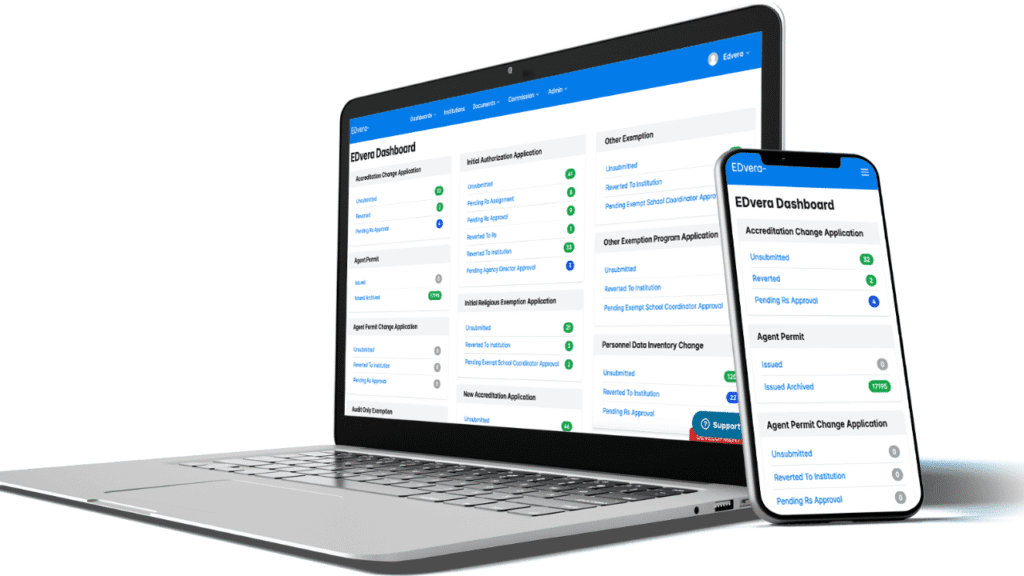
Real-Time Dashboard: Your Command Center
The dashboard serves as your centralized hub for all activities. One screen provides complete visibility into every document, application, and institution record in your system .
What you’ll see:
-
Work-in-progress status for each document
-
Actionable work queues
-
Transition notifications alerting responsible personnel
-
Visual representation of process stages
This isn’t just a nice-to-have feature. When one regulatory agency director says edvera “works as another staff person,” they’re referring to how the dashboard eliminates the need for manual status checking and follow-ups .
Automated Workflow Processing
Here’s where edvera truly shines. The workflow engine doesn’t just track work—it actively directs it .
When an institution submits an application:
-
The system automatically notifies the appropriate reviewer
-
Deadlines are tracked against your configured timelines
-
Status updates are pushed to stakeholders without manual intervention
-
Escalation triggers ensure nothing falls through cracks
One user commented, “There seems to be quite a bit of power to automate functions and to auto-populate information in documents” .
Document Management and Paperless Operations
Remember the Kentucky Board of Nursing’s challenge? They needed to digitally transform manual work, converting documents into digitally integrated forms while capturing all information in a centralized database with full audit trails .
edvera delivers exactly that.
Document capabilities include:
-
Upload scanned paper documents directly into the system
-
Access shared documents from anywhere
-
Comment and update information throughout submission
-
Revision control with complete change tracking
-
Auto-population of information across related documents
One director noted, “The software has also allowed us to eliminate virtually all paper from the office as it permits us to upload any scanned paper documents we receive directly into the system” .
Configurability Without Custom Development
Out-of-the-box software rarely fits regulatory processes perfectly. edvera addresses this through configurability—adapting to your specific needs without requiring custom code development .
The platform can be configured for:
-
Your specific document types and forms
-
Unique user roles and permissions
-
Custom workflows matching your processes
-
Industry-specific requirements (education, healthcare, etc.)
“We appreciate that we can customize edvera to our needs,” reports an Executive Director from government administration .
Audit Trails and Compliance Reporting
When auditors come calling, you need documentation. Not scattered emails and sticky notes.
edvera maintains complete audit trails containing every change and transaction . Every action is timestamped and attributed, creating defensible records for compliance verification.
The platform generates audit-ready reports automatically in real-time, streamlining process management and reducing errors .
How edvera Transforms the Licensing Lifecycle
Understanding the typical licensing process helps clarify where edvera delivers value. Here’s how the platform supports each stage :
Stage 1: Submission
Traditional process: Applicants print forms, complete them manually, mail or email attachments. Staff manually enters data into spreadsheets.
edvera approach: Applicants enter information directly into the system—no filing, scanning, or email attachments. Payments process online. Records instantly accessible in a centralized database.
Stage 2: Review and Revision
Traditional process: Reviewers work from printed copies. Feedback delivered via email or phone. Status tracking requires manual check-ins.
edvera approach: Applications and documents are online for easily-shared access. Status update notifications automatically sent. Dashboard provides real-time progress tracking for all stakeholders.
Stage 3: Resubmission
Traditional process: Corrections submitted separately. Version confusion common. No clear audit trail of changes.
edvera approach: Changes managed through revision control. Audit trail tracks every modification. Real-time updates reflect instantly in the system.
Stage 4: Approval
Traditional process: Approval letters drafted manually. Certificates printed and mailed. Significant delay between decision and notification.
edvera approach: Processing streamlined and expedited. Notification letters and certificates automatically generated and distributed electronically.
Stage 5: Reporting and Renewal
Traditional process: Manual tracking of renewal dates. Outreach requires individual contacts. Starting from scratch each cycle.
edvera approach: Automated reminders help manage applicants. Forms pre-populated with existing information. Renewal becomes “just another process” managed through the system.
Real Results: What Users Actually Experience
Let’s move beyond feature lists to actual outcomes. Here’s what organizations achieve with edvera, based on verified user reviews :
Efficiency Gains
One Director in government administration reports: “The software has allowed both our staff and our customers to save time and increase efficiency. We are also able to use the system from anywhere (home, office, on-site) which has provided a great deal of flexibility during the pandemic and afterwards since staff is able to work remotely or in the office with little disruption to office processes” .
Productivity Impact
Another user emphasizes the staffing impact: “This product has greatly increased the productivity of my office. With a small staff, the edvera system allows work to take place no matter the location and archive to keep documents available for any staff member to review and answer questions” .
Streamlined Operations
A Data Control Manager shares: “This product has made my life so much easier. It has streamlined our processes for document submission and management of institutional data. We have all appreciated the much-needed update to our antiquated systems” .
Partnership Approach
Multiple users highlight the vendor relationship: “Working with edvera staff and leadership has been great. They are very responsive to our needs” . “The project liaison is knowledgeable, offers suggestions, and maintains contact. They seem to have solid internal communication between their project leads and developers” .
Implementation Insights: Making Your Transition Successful
Based on implementation experiences shared by users, here’s what contributes to successful edvera adoption:
The Collaborative Process
edvera implementation follows a collaborative approach :
-
Your staff works with edvera consultants to identify all documents and processes
-
User roles and permissions are defined
-
Configuration is reviewed and confirmed against a jointly developed project plan
-
Ongoing support ensures continued success
One user noted they’re “still developing our edvera platform” and appreciated that “edvera has been very helpful in facilitating our transition to a management system” .
Common Challenges (and How to Address Them)
No software implementation is without hurdles. Here’s what users mention and how to prepare:
Challenge: Search and filter functions may not feel intuitive initially .
Preparation: Plan for training time. Work with your edvera contact to understand search logic.
Challenge: User permissions can get complicated when users have multiple roles .
Preparation: Map roles thoroughly before configuration. Think through all scenarios.
Challenge: Custom report development may require additional funding .
Preparation: Prioritize reporting needs. Understand what’s included in implementation versus development.
Challenge: Importing historical documents requires strategy .
Preparation: Develop a phased approach to historical data migration.
Challenge: System speed can occasionally lag .
Preparation: Discuss performance expectations and monitoring during implementation.
Is edvera Right for Your Organization?
You Should Consider edvera If:
-
You process applications, renewals, or compliance reports manually today
-
Your team spends significant time on status updates and follow-ups
-
You struggle to maintain consistent audit trails
-
Remote work flexibility matters to your organization
-
You need to scale operations without proportional staff increases
-
Paper documents are still circulating in your office
You Might Explore Alternatives If:
-
You need extensive integrations with specific existing systems (verify compatibility)
-
Your primary need is policy management rather than application processing
-
You require a solution with public pricing models (edvera pricing requires consultation)
Frequently Asked Questions
Q: What industries does edvera serve?
A: edvera serves multiple industries including education regulatory agencies, accreditation commissions, healthcare boards (nursing, massage therapy), state licensing agencies, and government regulatory bodies. The platform has been implemented for organizations managing compliance in education, healthcare, child care, business operations, and construction permitting .
Q: Does edvera offer a free trial?
A: Yes, edvera offers a free trial option. While the platform does not have a free version, interested organizations can request a trial to evaluate functionality before committing .
Q: Can edvera handle site visit and peer review processes?
A: Yes. The platform supports site visits, team reports, and commission agendas. It validates submissions and ensures completion for accreditation reviews. However, some users note that granting access to specific documents for peer evaluators could use improvement .
Q: What support options are available?
A: edvera offers email/help desk support, phone support, and FAQs/forum resources. Implementation includes collaborative consulting where edvera staff guides your team through configuration .
Q: How does edvera handle document security and permissions?
A: The platform includes role-based permissions configured to meet each client’s needs, defining access rights and the ability to take specific actions. All documents and transactions are secured with complete audit trails tracking every change .
Conclusion
Here’s the truth about compliance work: it never gets simpler on its own. Applications increase. Regulations evolve. Reporting requirements expand.
What changes is your capacity to handle the complexity.
edvera represents a fundamental shift from reactive compliance management to proactive, streamlined operations. The organizations adopting this platform aren’t just digitizing paper—they’re reimagining how regulatory work gets done.
The Missouri Department of Higher Education transitioned from manual paper-based processes to a 100% online document management system . The Kentucky Board of Nursing digitally transformed work that should no longer be done manually . The Commission on Massage Therapy Accreditation found edvera “user-friendly and absolutely worth the investment” .
Your organization can join them.
Ready to explore what edvera could mean for your team?
Start by documenting your current pain points. Map your ideal workflow. Then reach out for a personalized demonstration that addresses your specific needs.