
Creating slides used to take hours. Today, AI can help you build a full deck in minutes.
The best AI presentation makers can turn simple text into clear slides, saving time for work, school, and marketing.
1. Dokie AI
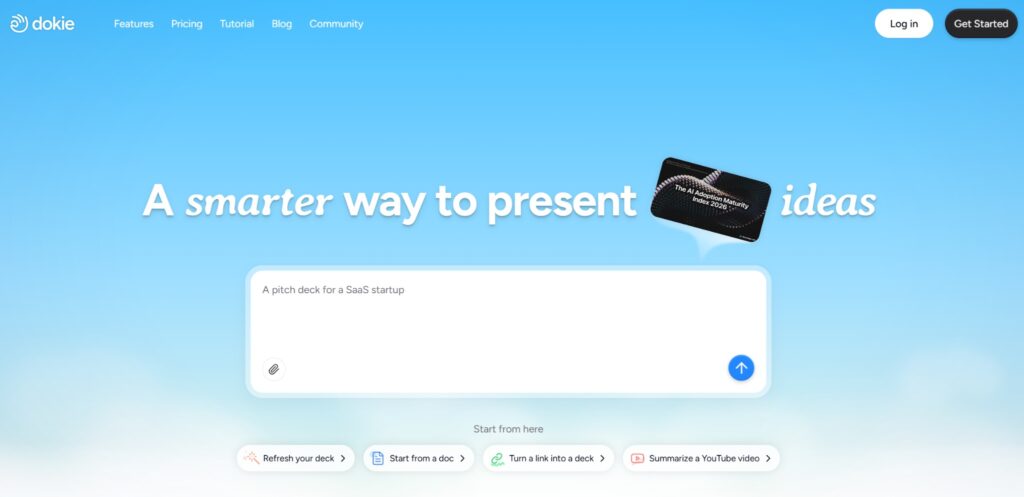
Dokie AI is one of the most powerful AI presentation makers in 2026. It focuses on creating professional slide decks that follow a clear structure. Instead of only generating text, Dokie AI builds full presentation outlines that are ready for real business use.
Users can enter a topic, a short prompt, or a few notes. The AI then creates a full slide deck with titles, bullet points, and a logical flow. This makes it especially helpful for reports, marketing plans, and business meetings.
One key strength of Dokie AI is its traditional slide format. Many AI tools create web-style pages, but Dokie AI produces slides that feel closer to normal PowerPoint decks. This means less editing before presenting.
The tool also allows users to edit slides quickly, change layouts, and export to PowerPoint. For teams that create slides every week, it can save a lot of time.
Pros
- Strong slide structure for business use
- Fast AI PPT generation
- Easy to edit and adjust slides
- Supports PowerPoint export
Cons
- Newer product compared to older tools
- Fewer design templates than some competitors
2. Gamma APP
Gamma APP is a popular AI presentation maker that focuses on modern and interactive presentations. Instead of traditional slides, Gamma often creates web-style presentations that can be shared with a simple link.
Users can type a prompt or paste content, and Gamma will generate a full presentation with text, images, and sections. The layout often looks clean and modern, making it good for online sharing and quick presentations.
Gamma is also known for its strong collaboration features. Teams can work on presentations together, edit slides in real time, and share them instantly.
However, some users find that Gamma presentations feel less like traditional PowerPoint slides. When preparing for formal meetings or client presentations, users may still need to reorganize some slides.
Even with that limitation, Gamma APP remains one of the most widely used AI presentation makers today.
Pros
- Clean and modern presentation design
- Fast AI content generation
- Easy sharing with links
- Strong collaboration tools
Cons
- Slides may need restructuring for business decks
- Less traditional PowerPoint layout
3. SlidesGPT
SlidesGPT is an AI slides generator designed to turn simple prompts into full presentations. The tool focuses on speed and simplicity, making it a good option for users who need quick slide drafts.
To create a presentation, users only need to type a topic. SlidesGPT will then generate slides with titles and bullet points that explain the topic step by step. The result is often a simple but useful presentation structure.
SlidesGPT is especially helpful for students, teachers, and professionals who need quick presentations without spending hours writing content.
Another useful feature is export support. Many generated presentations can be downloaded and edited later in PowerPoint or Google Slides.
However, the design quality is more basic compared to some other AI presentation makers. Users may still want to improve visuals after exporting the slides.
Overall, SlidesGPT is a practical AI PPT maker for quick slide creation.
Pros
- Very simple to use
- Fast AI slides generation
- Good for quick presentation drafts
- Supports export to common slide formats
Cons
- Design styles are fairly basic
- Limited customization features
4. Beautiful AI
Beautiful AI is a well-known AI presentation maker that focuses heavily on design automation. Its goal is to help users create visually clean slides without needing design skills.
The platform uses smart layout rules. When users add text, charts, or images, the AI automatically adjusts spacing, alignment, and slide structure. This helps keep presentations looking neat and professional.
Beautiful AI offers many templates that work well for pitch decks, reports, and company presentations. The platform also provides tools for charts and data visualization.
However, Beautiful AI works more like a smart design assistant than a full AI content generator. Users may still need to write most of the presentation content themselves.
Even so, the tool is very popular among teams that want consistent slide design without spending time adjusting layouts.
Pros
- Strong design automation
- Clean and professional slide templates
- Good chart and data tools
- Helps keep slides visually consistent
Cons
- AI content generation is limited
- Requires more manual input than some AI PPT makers
5. Tome
Tome is an AI presentation maker designed for storytelling. It focuses on creating presentations that combine text, images, and narrative flow.
Users can describe a topic, and Tome will generate a presentation with sections, visuals, and structured content. The slides often feel more like a story than a traditional report.
Tome is especially useful for startup pitches, creative presentations, and product demos. The AI can also help generate images and visual elements inside the presentation.
However, the storytelling format may not always match the needs of formal business presentations. Users who want a strict slide structure may need to adjust the output.
Even so, Tome remains a strong AI slides generator for creative work.
Pros
- Strong storytelling style presentations
- Built-in AI image generation
- Easy prompt-based slide creation
- Good for startup pitches
Cons
- Less traditional slide structure
- May require editing for formal presentations
6. Canva Magic Design
Canva Magic Design is part of the Canva design platform. It allows users to create presentations using AI with only a short prompt or document upload.
The AI analyzes the content and generates slides using Canva templates. Because Canva already has a huge design library, users can easily adjust colors, fonts, and images.
One major advantage of Canva Magic Design is accessibility. Many users already use Canva for design work, so learning the presentation tool is easy.
However, Canva presentations sometimes require manual editing after generation. The AI helps with layout and suggestions, but users still need to refine content.
For users who want a design-focused AI presentation maker, Canva Magic Design is a strong choice.
Pros
- Large library of templates
- Easy editing and design tools
- Integrated with Canva ecosystem
- Good for visual presentations
Cons
- AI slide structure may need editing
- Less focused on business reports
7. Presentations AI
Presentations AI is a newer AI PPT maker designed to help users create presentations quickly from simple prompts.
The tool focuses on generating structured slide decks with clear titles and bullet points. Users can also adjust themes, colors, and layouts after the slides are generated.
Presentations AI works well for students, marketing teams, and professionals who need presentations quickly. The interface is simple, making it easy for beginners to start creating slides.
However, the tool still lacks some advanced features found in older presentation platforms. Users who need complex editing options may still prefer traditional slide tools.
Even so, Presentations AI continues to grow in popularity as more people look for simple AI slides generators.
Pros
- Easy prompt-based presentation creation
- Beginner-friendly interface
- Fast slide generation
- Clean design themes
Cons
- Limited advanced editing tools
- Smaller template library
8. Pitch
Pitch is a presentation platform designed for teams. While it is not purely an AI presentation maker, it includes AI features that help generate content and improve slide layouts.
The platform is built for collaboration. Multiple team members can edit slides at the same time, making it useful for startup teams and marketing groups.
Pitch also provides modern templates and strong brand control tools. Companies can maintain consistent colors, fonts, and slide formats across all presentations.
The AI features mainly help with writing content and improving slide structure. However, the AI generation is not as advanced as some newer AI PPT makers.
Still, Pitch remains a powerful presentation tool for teams that value collaboration.
Pros
- Excellent team collaboration tools
- Modern templates and layouts
- Strong brand management features
- Useful AI writing assistance
Cons
- AI slide generation is limited
- Some features require paid plans
9. Decktopus
Decktopus is another AI presentation maker that focuses on fast slide creation. Users can type a topic, and the AI will generate a full presentation structure.
One helpful feature is the built-in slide guidance. Decktopus suggests what kind of content should appear on each slide, helping users organize ideas more clearly.
The platform also includes design themes and icons that improve the look of presentations without much effort.
However, Decktopus presentations may still need manual editing, especially when preparing for professional presentations.
Even with that limitation, Decktopus remains a useful AI slides generator for quick presentation building.
Pros
- Fast AI presentation generation
- Helpful slide content suggestions
- Simple and beginner-friendly interface
- Good design themes
Cons
- Limited design customization
- AI content may require editing
10. Simplified AI
Simplified AI is a multi-purpose AI platform that includes an AI presentation maker. In addition to slides, the tool can also generate text, images, and marketing content.
Users can create presentations by entering a topic or outline. The AI then generates slides with headings, bullet points, and visuals.
Because Simplified AI is a full content platform, it works well for marketing teams that already use AI tools for writing and design.
However, the presentation tool is only one part of the platform. As a result, it may not be as specialized as dedicated AI PPT makers.
Still, Simplified AI offers a convenient all-in-one solution for content creation.
Pros
- All-in-one AI content platform
- AI tools for text, images, and slides
- Simple slide generation process
- Good for marketing teams
Cons
- Presentation features are less specialized
- Design options are limited
FAQs
1. What is an AI presentation maker?
An AI presentation maker is a tool that uses artificial intelligence to create slides automatically. Users only need to enter a topic or prompt, and the AI generates slide titles, content, and layouts.
2. Are AI PPT makers better than PowerPoint?
AI PPT makers are not replacements for PowerPoint, but they can make slide creation faster. Many AI tools generate the first draft, which users can later edit in PowerPoint.
3. Can AI slides generators create full presentations?
Yes. Many AI slides generators can build a full presentation with titles, bullet points, and structure based on a short prompt.
4. Which AI presentation maker is best for business use?
Many users prefer tools like Dokie AI or Beautiful AI because they create slides that follow clear business presentation structures.
5. Are AI presentation makers free?
Some AI presentation makers offer free plans with limited features. Advanced features like export options and premium templates often require paid plans.
Conclusion
AI presentation makers are changing how people create slides. With tools like Dokie AI, Gamma, and Beautiful AI, users can turn simple ideas into full presentations in minutes. These tools save time and help anyone create clear, professional slides.