
You can use Claude AI for free in 2026 by signing up at claude.ai and accessing the newly expanded free tier. Free users now get File Creation (generate Word, Excel, PowerPoint, PDFs), Connectors (link to Google Drive, Slack, Canva), Skills (custom instruction sets), and Compaction (long conversation memory). The free plan runs on Claude Sonnet 4.6—Anthropic’s latest model approaching Opus-level intelligence—with usage limits resetting every 5 hours (approximately 10-15 messages per session, depending on complexity). No credit card required.
Introduction
Remember when $20 a month was the price of admission for serious AI work?
Those days are over.
In February 2026, Anthropic quietly dropped a bombshell: four premium features—previously locked behind paywalls—are now completely free . File creation. Third-party app connectors. Custom skills. Conversation compaction. All available at zero cost.
And here’s the kicker: free users now run on Claude Sonnet 4.6, a model that developers prefer over Opus 4.5 about 60% of the time . We’re talking near-frontier intelligence for the price of a free email signup.
I’ve spent the last month testing exactly where the free tier shines—and where it pinches. This guide walks you through every feature, every limit, and every strategy to make Claude your daily driver without spending a dime.
Let’s dive in.
What’s Actually Free on Claude in 2026?
Anthropic has dramatically expanded the free tier. Here’s exactly what you get:
| Feature | What It Does | Previously Paid? |
|---|---|---|
| File Creation | Generate Word docs, Excel spreadsheets, PowerPoint presentations, PDFs directly in chat | Yes |
| Connectors | Link to Google Drive, Slack, Canva, Figma, Box, GitHub, Monday.com | Yes |
| Skills | Save reusable instruction sets (tone, format, preferences) | Yes |
| Compaction | Summarize long conversations to continue without hitting limits | Yes |
| Claude Sonnet 4.6 | Latest model with 1M token context (beta), 79.6% on SWE-bench coding | No (new default) |
| Web Search | Real-time internet access | No |
| Image Analysis | Extract text and insights from uploaded images | No |
| Mobile Apps | iOS and Android access | No |
The model matters. Sonnet 4.6 represents a massive leap. It scores 91.7% on τ-bench Retail (tool-use tasks) and handles 1-million-token contexts—think entire codebases or multi-hundred-page documents . Free users get this.
Step-by-Step: How to Access Claude AI for Free
Step 1: Create Your Account
Navigate to claude.ai. Click “Sign up” in the top right.
You can register with:
-
Google account (fastest)
-
Email address
-
GitHub account (recommended for developers)
No credit card required. No trial period that expires. This is genuinely free, forever.
Step 2: Verify and Log In
Check your email for the verification link. Click it, log in, and you’re staring at Claude’s clean chat interface.
Pro tip: Bookmark the page immediately. You’ll be here a lot.
Step 3: Enable Advanced Features (One-Time Setup)
This step separates casual users from power users.
Click your profile icon in the bottom-left corner. Select Settings > Capabilities.
Toggle on:
-
✅ Code execution and file creation (unlocks document generation)
-
✅ Connectors (enables third-party app integration)
Do this now. It takes ten seconds and unlocks half the value of the free tier.
Step 4: Start a Conversation
Type something. Anything. “Summarize this concept” or “Help me draft an email.”
Claude will respond using Sonnet 4.6 by default. You’re already running on Anthropic’s latest architecture.
How to Use Claude’s Premium Free Features (With Examples)
File Creation: Generate Actual Documents
This isn’t just text in a chat bubble. Claude now creates real, downloadable files.
To use it: Simply ask Claude to create something specific.
Example prompt: “Create a project timeline spreadsheet for launching a mobile app. Include columns for task, owner, start date, end date, and status. Format as Excel.”
Claude generates the spreadsheet. A download button appears in the right pane. Click it. You now have a functional .xlsx file .
What you can create:
-
Word documents (reports, proposals, letters)
-
Excel spreadsheets (budgets, trackers, data analysis)
-
PowerPoint presentations (with actual slides and formatting)
-
PDFs (combine images, text, formatted content)
-
Code scripts (.py, .js, .html)
Power move: Upload a messy CSV. Ask Claude to “clean this data and create a formatted Excel file with charts.” Done in seconds .
Connectors: Link Claude to Your Apps
Connectors turn Claude from a standalone chatbot into a workflow hub. They’re powered by Anthropic’s Model Context Protocol (MCP) .
How to set up connectors:
-
Click the + icon next to the prompt box
-
Select Add connectors
-
Browse available apps or search by name
-
Click on your chosen app and authorize access (OAuth login)
Supported connectors include :
-
Google Drive (read docs, sheets)
-
Gmail (draft and send emails)
-
Slack (post messages, check channels)
-
Canva (design graphics)
-
Figma (review designs)
-
GitHub (access repos)
-
Box (file management)
-
Monday.com (project management)
-
Trivago (travel searches)
-
Zapier (automation)
-
PayPal (payments)
Real-world example: Connect Slack and Google Drive. Ask Claude: “Check the #marketing channel for any requests about the Q3 report, then draft a response and save it to Drive.” Claude does exactly that .
Skills: Teach Claude Your Preferences
Skills are reusable instruction sets. Think of them as macros for AI interactions .
Creating a skill:
-
Go to Settings > Capabilities
-
Click Add under Skills
-
Choose “Create with Claude” or upload a text file
What to include in a skill file:
-
Preferred tone (formal, casual, technical)
-
Response length preferences
-
Industry-specific terminology
-
Personal or company background
-
Output formatting rules
Example skill file content:
I want Claude to communicate in a casual but professional style.
Responses should be detailed (3-5 paragraphs minimum).
I'm a freelance technology writer—use industry terminology freely.
Always include practical examples when explaining concepts.
Format responses with clear headings and bullet points where appropriate.
Upload this once. Every future conversation automatically follows these guidelines. No more repeating yourself .
Compaction: Never Lose Context
Long conversations hit token limits. Compaction solves this by summarizing earlier parts automatically .
How it works: When your conversation gets lengthy, Claude quietly compresses previous exchanges into a concise summary. The chat continues seamlessly. You don’t notice it happening—you just never hit “conversation too long” errors.
Try this: Start a complex project. Come back tomorrow. Claude greets you with a summary of where you left off .
Claude Free Tier Limits: What You Need to Know
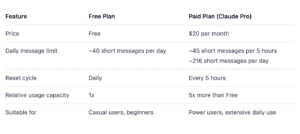
Nothing’s truly unlimited. Here’s the reality of free-tier constraints.
Usage Caps
-
Message limits: Approximately 10-15 messages per 5-hour session (varies by message length and complexity)
-
Reset window: Every 5 hours from your first message
-
Model access: Sonnet 4.6 and Haiku (Opus requires paid plan)
What You DON’T Get (Free vs Paid)
| Feature | Free | Pro ($20/mo) | Max ($100-200/mo) |
|---|---|---|---|
| Claude Opus 4.6 | ❌ | ✅ | ✅ |
| Claude Code | ❌ | ✅ | ✅ |
| Claude Cowork (agent automation) | ❌ | ✅ | ✅ |
| Claude in Excel | ❌ | ✅ | ✅ |
| Claude in PowerPoint | ❌ | ❌ | ✅ |
| Priority during peak times | ❌ | ❌ | ✅ |
| Messages per 5 hours | ~10-15 | ~45+ | 225-900+ |
When to Upgrade
You’re fine on free if:
-
You use Claude for occasional tasks (drafts, summaries, brainstorming)
-
Your messages are moderate length (under 2,000 tokens each)
-
You don’t need Opus for deep reasoning tasks
Consider upgrading if:
-
You hit rate limits daily
-
You need Claude Code for development work
-
You require consistent access during business hours
-
You’re analyzing massive documents regularly
5 Ways to Maximize Claude Free (Power User Strategies)
1. Use Projects to Cache Context
Projects let you upload reference materials once. Claude caches them, reducing token usage and extending your session limits .
How: Click “Projects” in the sidebar. Create a new project. Upload style guides, product specs, or knowledge bases. Every conversation in that project starts with full context—without eating your message quota.
2. Start New Threads Strategically
Each conversation has its own token count. When you feel Claude slowing down or approaching limits, start fresh.
Pro tip: Use compaction summaries as your “handoff document.” Ask Claude to summarize key decisions, then paste that into a new chat.
3. Batch Your Work
Free limits reset every 5 hours. Plan around this.
If you have heavy lifting, batch it into one focused session. Draft all your emails. Analyze all your documents. Then step away. Come back after the reset for the next batch.
4. Master Skills for Consistency
Create multiple skills for different contexts:
-
“Technical Writer Mode”
-
“Executive Summary Mode”
-
“Brainstorming Partner”
-
“Code Reviewer”
Switch between them instantly. No need to re-prompt your preferences each time .
5. Combine Connectors for Automation
String connectors together for multi-step workflows.
Example: Connect Google Calendar + Gmail + Slack. Prompt: “Check my calendar for tomorrow’s meetings. Draft reminder emails for each, then post a summary in the #team channel.”
Claude handles all three steps. You handle coffee .
Claude Free vs ChatGPT Free: Which Wins in 2026?
Here’s how they stack up:
| Category | Claude Free | ChatGPT Free |
|---|---|---|
| Latest Model | Sonnet 4.6 (frontier-level) | GPT-5.3-Codex-Spark (mid-tier) |
| Context Window | 1M tokens (beta) | 128K tokens |
| File Creation | Word, Excel, PPT, PDF | Limited |
| Connectors | Slack, Drive, Canva, Figma, etc. | Limited integrations |
| Web Search | Yes | Yes (with ads) |
| Ads | None (“No ads in sight”) | Coming to free tier |
| Rate Limits | ~10-15 messages/5h | ~20-30 messages/3h |
The verdict: If you need deep reasoning, long context, or professional document generation, Claude wins. ChatGPT’s free tier may soon include ads—Claude remains ad-free .
Special Access: Free Claude API for Developers
Here’s something most users don’t know: Anthropic offers free Claude API access to open-source maintainers .
The Claude for OSS Program
If you maintain a popular open-source project, you can apply for:
-
Up to 20x the normal API limits
-
Access to Claude Opus 4.6, Sonnet 4.6, and Haiku
-
Vision capabilities and tool use
-
Extended context windows
Eligibility Requirements
-
Project must use OSI-approved open-source license
-
Active development with regular updates
-
Meaningful user base
-
Public repository (GitHub, GitLab)
How to Apply
-
Gather repository links and contribution history
-
Visit Anthropic’s Claude for OSS page
-
Complete the application form
-
Wait 1-2 weeks for review
What You Can Build
-
API documentation generators
-
Automated test suites
-
Code review bots
-
Developer tooling
-
Learning resources
This program is real. If you qualify, apply immediately.
Frequently Asked Questions (FAQ)
Is Claude AI really free forever?
Yes, the free tier is permanent. It’s not a trial. Anthropic offers free access indefinitely, supported by paid subscriptions for power users and enterprises .
How many messages can I send on the free plan?
Approximately 10-15 messages per 5-hour session, depending on message length and complexity. The in-app usage monitor shows your current status .
Can I use Claude on my phone for free?
Yes. Claude offers free iOS and Android apps with all free-tier features included .
Does the free plan include web search?
Yes. Free users can access real-time web search by toggling it on in conversations .
What’s the difference between Sonnet and Opus?
Sonnet 4.6 (free tier) offers near-frontier performance—great for coding, analysis, and everyday tasks. Opus 4.6 (paid only) handles the deepest reasoning: complex codebase refactoring, multi-agent coordination, problems where perfect accuracy is paramount .
Conclusion
Here’s my honest take after weeks of testing.
For most professionals, the free tier is enough.
You get:
-
A model that rivals last year’s Opus
-
Document generation that replaces basic Office work
-
App integrations that automate workflows
-
Long memory for complex projects
All for zero dollars.
The paid plans still make sense if you:
-
Hit rate limits daily (power users, developers)
-
Need Opus for mission-critical reasoning
-
Want Claude Code for automated development
-
Require priority access during business hours
But here’s the thing: start free. See where you hit walls. Most people won’t.
Anthropic’s bet is simple: give away enough value that users fall in love, then upgrade when they need more. It worked on me—I kept my Pro subscription for Claude Code access. But for 80% of use cases, the free tier delivers everything you need.
Your next step: Go to claude.ai. Sign up. Enable file creation and connectors. Ask Claude to build you something real.
The $20 barrier is gone. Welcome to 2026.