

Grammarly is one of the most downloaded writing tools in the world — with over 40 million daily active users in 2026. But is it actually worth paying for?
I’ve tested Grammarly extensively across blog posts, emails, reports, and academic writing. In this review, I’ll break down every feature, compare the free vs paid plans, give you the real pricing, and tell you honestly whether it’s worth your money.
Short answer: Yes — but only if you write regularly. Here’s why.
What is Grammarly?
Grammarly is an AI-powered writing assistant that checks your spelling, grammar, punctuation, tone, clarity, and style in real time. It works across virtually every platform where you write:
- Google Docs
- Microsoft Word
- Gmail and Outlook
- Social media (Twitter/X, LinkedIn, Facebook)
- Any website with a text field (via browser extension)
- Slack, Notion, and most productivity apps
Think of it as a smart editor that sits quietly in the background — catching mistakes before you hit send, flagging unclear sentences, and suggesting improvements as you type.
In 2026, Grammarly has evolved well beyond a simple spell checker. It’s now a full AI writing assistant with features powered by its own AI model (GrammarlyGO) and integrations with major platforms.
Grammarly Features — What Does It Actually Do?
1. Grammar and Spelling Checks
This is what Grammarly is famous for — and it’s still the best grammar checker available. It catches:
- Grammatical mistakes
- Spelling errors
- Punctuation problems
- Run-on sentences and sentence fragments
- Passive voice overuse
- Subject-verb agreement errors
What sets it apart from basic spell checkers: Grammarly explains why something is wrong and how to fix it — helping you actually improve your writing over time, not just fix individual mistakes.
2. Clarity and Readability Improvements
Grammarly analyzes your writing for clarity and suggests simpler, more direct alternatives. If a sentence is too complex or wordy, it flags it and shows you a cleaner version.
This is particularly useful for professional writing — reports, proposals, and emails where clear communication matters.
3. Tone Detection
Grammarly’s tone detector analyzes your writing and tells you how it will come across to the reader — confident, formal, friendly, apologetic, or aggressive.
This is genuinely useful for emails where tone can be easily misread. You can adjust the tone to match your audience before sending.
4. GrammarlyGO — AI Writing Assistant
GrammarlyGO is Grammarly’s integrated AI writing assistant, powered by a combination of Grammarly’s own model and generative AI.
What GrammarlyGO can do:
- Rewrite entire paragraphs
- Generate text from scratch based on a prompt
- Summarize long documents
- Change the tone of your writing
- Improve clarity with one click
- Generate email replies
Free plan: 100 AI prompts per month Pro plan: 2,000 AI prompts per month
This is a massive upgrade for Pro users — 20x more AI assistance than the free tier.
5. Plagiarism Detection (Pro only)
Grammarly’s plagiarism checker compares your text against billions of web pages and academic papers to detect potential plagiarism.
This is invaluable for:
- Students submitting essays and assignments
- Content writers checking for accidental duplication
- Academics verifying originality
The plagiarism checker is a Pro-only feature — you won’t get it on the free plan.
6. Vocabulary Enhancement (Pro only)
Grammarly suggests context-appropriate synonyms and alternatives when you overuse a word or when a simpler/stronger word exists.
This helps diversify your vocabulary and makes writing sound more polished — particularly useful for bloggers, content writers, and students.
7. Style and Consistency (Pro only)
Grammarly detects inconsistencies in your writing — mixed capitalization, inconsistent hyphenation, varying spelling of the same word — and suggests fixes for a more professional, consistent result.
8. Genre-Specific Suggestions (Pro only)
Grammarly lets you set your writing context — academic, business, casual, creative, technical — and adjusts its suggestions accordingly.
Academic writing gets different feedback than a marketing email. This context-aware editing is a significant improvement over one-size-fits-all grammar checkers.
Grammarly Pricing 2026
Grammarly offers three main plans:
| Plan | Monthly Price | Annual Price | Best For |
|---|---|---|---|
| Free | $0 | $0 | Casual writers, basic corrections |
| Pro | $30/month | $12/month | Professionals, writers, students |
| Business | Custom | From $15/user/month | Teams up to 149 members |
| Enterprise | Custom | Contact sales | Large organizations |
Important pricing notes:
- The $12/month rate requires annual billing — paid upfront as $144/year
- Month-to-month Pro costs $30/month — significantly more expensive
- Grammarly does not offer student discounts
- There is a 7-day free trial for Pro features
- No refund policy — once you pay, you can cancel but won’t get money back
- Grammarly periodically offers up to 60% off during Black Friday sales in November
Is $12/month worth it? For daily writers — yes, absolutely. For occasional writers — the free plan may be sufficient.
Grammarly Free vs Pro — What’s the Difference?
| Feature | Free | Pro |
|---|---|---|
| Grammar & spelling checks | ✅ | ✅ |
| Basic punctuation | ✅ | ✅ |
| Tone detection | ✅ (basic) | ✅ (advanced) |
| Clarity suggestions | ✅ (limited) | ✅ (full) |
| AI prompts (GrammarlyGO) | 100/month | 2,000/month |
| Plagiarism checker | ❌ | ✅ |
| Vocabulary enhancement | ❌ | ✅ |
| Genre-specific suggestions | ❌ | ✅ |
| Advanced rewrites | ❌ | ✅ |
| Style consistency | ❌ | ✅ |
| Full sentence rewrites | ❌ | ✅ |
The free plan handles the basics well. But the Pro plan is genuinely a different product — particularly the plagiarism checker and 2,000 AI prompts.
Where Does Grammarly Work?
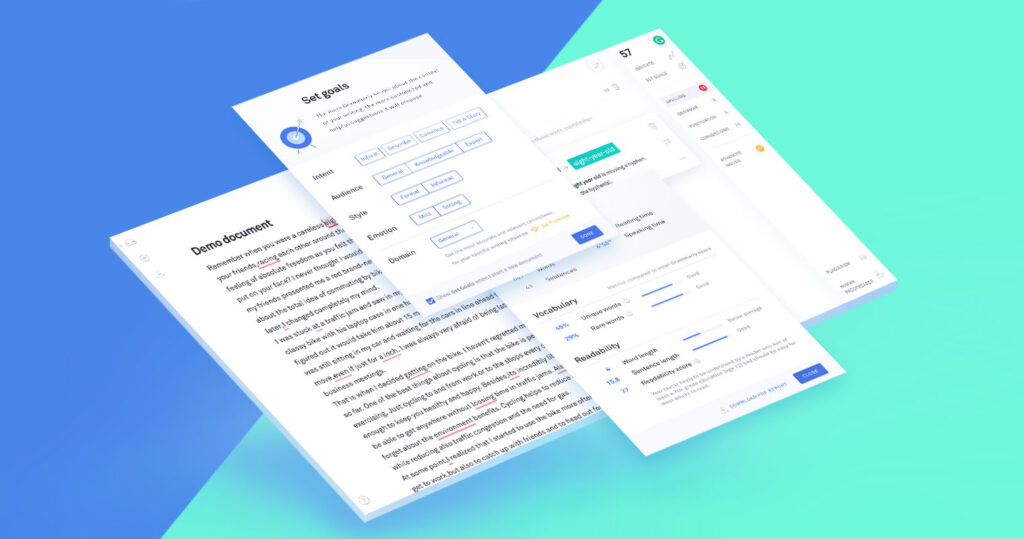
One of Grammarly’s biggest advantages is how many places it works:
Browser Extension (Chrome, Firefox, Safari, Edge): Works on virtually any website — Gmail, Google Docs, social media, forms, and more. This is the most popular way to use Grammarly.
Desktop App (Windows & Mac): A standalone app where you can paste or write text for detailed analysis.
Microsoft Word and Outlook Add-in: Works directly inside Word documents and Outlook emails.
Google Docs: Real-time suggestions directly in your Google Docs — no copy-pasting needed.
Mobile (iOS and Android): A keyboard replacement that checks your writing in any app on your phone.
Grammarly Pros and Cons
✅ Pros
Real-time corrections everywhere: The browser extension works seamlessly across hundreds of platforms — you never have to leave your workflow to check your writing.
Catches errors other tools miss: Grammarly finds contextual errors that basic spell checkers completely miss — like using “their” instead of “there” in the right spelling but wrong context.
Explains mistakes: Unlike basic checkers, Grammarly tells you why something is wrong — helping you learn and improve over time.
GrammarlyGO is genuinely useful: The AI writing features in 2026 are solid — rewriting paragraphs, adjusting tone, and generating content on demand.
Works across devices: Desktop, browser, mobile — your writing is checked everywhere.
Plagiarism detection: The built-in plagiarism checker is one of the best available and included in the Pro plan at no extra cost.
❌ Cons
Pro requires annual billing for the best price: The monthly rate ($30) is expensive. You need to commit to a year ($144) for the good price.
No refund policy: If you decide it’s not for you after buying, you can cancel but won’t get your money back.
Can be overly conservative: Grammarly’s suggestions sometimes strip personality from casual or creative writing. It prefers formal, polished language — which isn’t always what you want.
Not ideal for cold emails: Grammarly makes writing sound too polished and formal. Cold emails should sound human and conversational — running them through Grammarly can kill reply rates.
No student discount: Despite being widely used in academia, Grammarly charges everyone the same price regardless of student status.
Data privacy concerns: Your text is sent to Grammarly’s servers for analysis. For sensitive or confidential documents, this is worth considering.
Who Should Use Grammarly?
Free is great for:
- Casual writers who want basic grammar and spelling checks
- People who occasionally write emails or social posts
- Anyone who wants to catch obvious typos before hitting send
Pro is worth it for:
- Bloggers and content writers who publish regularly — the clarity improvements and AI rewrites save hours
- Students writing essays, reports, and academic papers (the plagiarism checker alone justifies the cost)
- Professionals who write emails, proposals, and reports daily
- Non-native English speakers who want extra confidence in their writing
- Anyone who writes more than 30 minutes per day
NOT ideal for:
- Cold email marketers (makes emails too formal)
- Creative writers who want to preserve their unique voice
- Casual users who write occasionally
Grammarly vs Alternatives 2026
| Tool | Best For | Free Tier | Paid Price |
|---|---|---|---|
| Grammarly | All-round writing | ✅ Good | $12/month (annual) |
| ProWritingAid | Deep editing, novels | ✅ Limited | $10/month (annual) |
| QuillBot | Paraphrasing, rewriting | ✅ Good | $9.95/month |
| Hemingway Editor | Readability, simplicity | ✅ Web free | $19.99 one-time |
| LanguageTool | Multilingual support | ✅ Good | $5.83/month |
Grammarly wins on: Real-time integration, ease of use, platform coverage, and the plagiarism checker.
ProWritingAid wins on: Deep editing features for long-form writing and novels.
QuillBot wins on: Pure paraphrasing and rewriting speed.
For most people — especially professionals and students — Grammarly is the best all-round choice.
Our Verdict — Is Grammarly Worth It in 2026?
Rating: 4.5/5 ⭐⭐⭐⭐½
Grammarly remains the gold standard for grammar checking and writing improvement in 2026. The Pro plan at $12/month (billed annually) adds powerful AI features — 2,000 AI prompts, plagiarism detection, advanced rewrites — making it a comprehensive writing assistant, not just a spell checker.
Bottom line:
- If you write daily — emails, reports, articles, essays — Pro is absolutely worth it.
- If you write occasionally — the free plan handles the basics well.
- If you’re a student — the plagiarism checker alone justifies the $144/year.
The 7-day free trial lets you test all Pro features before committing. Try it — your writing will improve immediately.
Frequently Asked Questions
Q1: Is Grammarly free to use?
Yes. Grammarly has a free plan that covers grammar, spelling, punctuation, basic tone detection, and 100 AI prompts per month. The Pro plan ($12/month annually) unlocks advanced features including plagiarism detection and 2,000 AI prompts.
Q2: How much does Grammarly Pro cost in 2026?
Grammarly Pro costs $12/month when billed annually ($144/year). Month-to-month billing costs $30/month. There are no student discounts, but Black Friday sales can offer up to 60% off.
Q3: Does Grammarly detect AI-generated content?
No — Grammarly does not flag AI-generated content as plagiarism. The plagiarism checker only checks for copied human-written content from the web.
Q4: Is Grammarly safe to use for confidential documents?
Grammarly sends your text to its servers for analysis. For highly confidential documents, consider using Grammarly’s desktop app with privacy settings enabled, or use an offline alternative.
Q5: Can Grammarly replace a human editor?
No — but it significantly reduces the work a human editor needs to do. Grammarly catches mechanical errors and clarity issues, but a human editor is still needed for overall structure, argument quality, and style decisions.
Q6: Does Grammarly work on mobile?
Yes. Grammarly has iOS and Android apps with a custom keyboard that checks your writing in any app. It also works in the mobile versions of Google Docs and other platforms.
Conclusion
Grammarly in 2026 is no longer just a grammar checker — it’s a full AI writing assistant that works everywhere you write. For anyone who writes professionally or academically, the Pro plan at $12/month is one of the best value tools available.
Start with the free plan. If you find yourself hitting the AI prompt limit or needing the plagiarism checker, upgrading to Pro is a no-brainer.