Servers generate a surprising amount of heat, and without constant cooling, even a small server room can overheat within minutes. This guide explains what a computer room air conditioning unit actually is, how it keeps data centers running safely, and how it compares to the newer systems replacing it.
Key Takeaways
- A CRAC (computer room air conditioning) unit is a specialized cooling system built specifically to regulate temperature and humidity in server rooms and data centers
- Unlike standard air conditioners, CRAC units are designed to run continuously and handle the dense, constant heat load produced by server racks
- CRAC units use refrigerant-based cooling, while the newer CRAH (computer room air handler) systems use chilled water instead
- Most data centers combine multiple CRAC units with hot aisle/cold aisle layouts to cool equipment efficiently
- Poor CRAC maintenance is one of the most common causes of unplanned data center downtime
What Is a Computer Room Air Conditioning (CRAC) Unit?
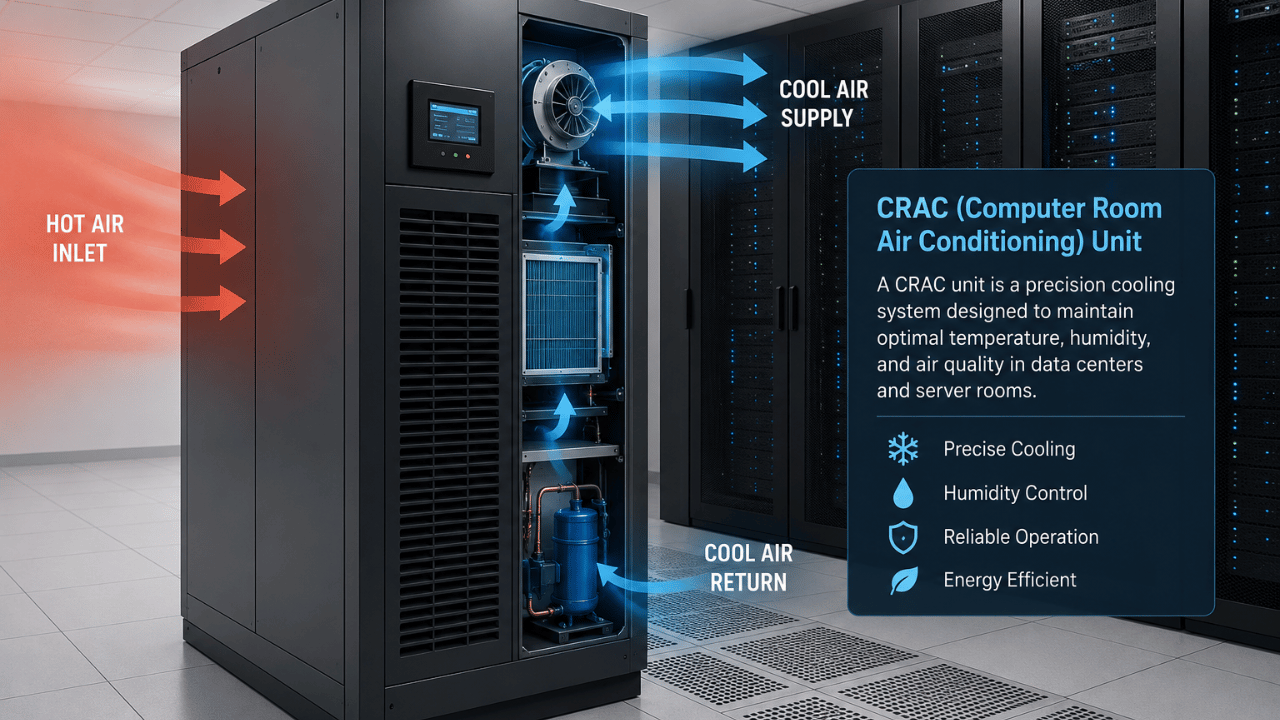
A computer room air conditioning unit, or CRAC unit, is a specialized cooling system designed specifically to regulate temperature and humidity in environments with high concentrations of computing equipment, such as server rooms and data centers. Unlike a standard household or office air conditioner, a CRAC unit is engineered to run continuously, around the clock, while managing a much denser and more consistent heat load than typical air conditioning is built to handle.
CRAC units don’t just cool the air — they also control humidity levels, since both excess moisture and overly dry air can damage sensitive server hardware. Most units monitor and adjust temperature and humidity automatically, keeping conditions within the narrow range that data center equipment needs to run reliably.
How Does a CRAC Unit Work?
A CRAC unit works by drawing in warm air from the server room, cooling it using a refrigerant-based system similar to a standard air conditioner, and then circulating the cooled air back into the room — typically through a raised floor or overhead ducting system. This creates a continuous cooling cycle that keeps server racks within safe operating temperatures even as they generate heat nonstop.
Most CRAC units are placed at the perimeter of a server room and paired with a hot aisle/cold aisle layout, where server racks are arranged so cold air intakes face one aisle and hot exhaust air vents into another. This layout prevents hot and cold air from mixing, which significantly improves cooling efficiency and reduces energy costs.
CRAC vs. CRAH: What’s the Difference?
The main difference between a CRAC and a CRAH unit is the cooling method: a CRAC (computer room air conditioning) unit uses a built-in refrigerant compressor to cool air directly, while a CRAH (computer room air handler) unit uses chilled water supplied from an external chiller plant. Because CRAH systems don’t need their own compressor, they’re generally more energy-efficient at scale, which is why many larger, modern data centers have shifted toward CRAH-based cooling.
| Factor | CRAC Unit | CRAH Unit |
|---|---|---|
| Cooling method | Built-in refrigerant compressor | Chilled water from external chiller |
| Best suited for | Smaller server rooms, standalone setups | Large-scale data centers |
| Energy efficiency | Lower at scale | Higher at scale |
| Maintenance complexity | Simpler, self-contained | Requires supporting chiller infrastructure |
Why Are CRAC Units Important for Data Centers?
CRAC units are critical because servers generate continuous heat, and even a short cooling failure can cause equipment to overheat, throttle performance, or shut down entirely to prevent hardware damage. Data centers typically operate with tightly controlled temperature ranges — often between 64–80°F (18–27°C) as recommended by industry standards — and CRAC units are what keep conditions inside that safe range around the clock.
Because of how critical consistent cooling is, most data centers also pair CRAC systems with reliable backup power, since a power interruption to the cooling system is just as dangerous as one to the servers themselves. This is closely tied to broader facility protection planning, including UPS power supply systems that keep both servers and cooling equipment running during an outage.
How to Maintain a CRAC Unit
- Replace air filters on a regular schedule. Clogged filters restrict airflow and force the unit to work harder, reducing both cooling efficiency and equipment lifespan.
- Monitor humidity levels closely. Both excess humidity and overly dry air can damage server components, so humidity control should be checked as routinely as temperature.
- Inspect for refrigerant leaks. A slow refrigerant leak can quietly reduce cooling capacity long before it becomes an obvious problem.
- Keep hot aisle/cold aisle containment intact. Gaps in containment let hot and cold air mix, forcing CRAC units to work harder than necessary.
- Schedule redundant unit testing. In setups with backup CRAC units, regularly test failover so you know the backup will actually work during a real failure.
- Track runtime and performance metrics. Sudden changes in runtime hours or output temperature often signal a developing mechanical issue before it causes an outage.
Frequently Asked Questions
CRAC stands for Computer Room Air Conditioning, a cooling system specifically designed to regulate temperature and humidity in server rooms and data centers.
A regular air conditioner is designed for occasional cycling and general comfort cooling, while a CRAC unit is built to run continuously, handle a much denser and steadier heat load, and precisely control both temperature and humidity.
Costs vary widely based on capacity and features, but small CRAC units for modest server rooms typically start in the low tens of thousands of dollars, while large-capacity units for enterprise data centers can cost significantly more.
No — many large, modern data centers have shifted to CRAH units or other advanced cooling methods like liquid cooling, though CRAC units remain common in smaller server rooms and older facilities.
If a CRAC unit fails without a backup in place, server room temperatures can rise quickly, potentially causing equipment to throttle performance, shut down automatically, or suffer permanent hardware damage from overheating.
Most industry guidelines recommend keeping server rooms between roughly 64–80°F (18–27°C), though the ideal setpoint depends on the specific hardware manufacturer’s recommendations.
Final Thoughts
A CRAC unit isn’t just an air conditioner bolted onto a server room — it’s a purpose-built system designed to keep sensitive equipment within a narrow, safe operating range around the clock. Whether you’re running a small server closet or planning a full data center buildout, understanding how CRAC (and CRAH) cooling works is essential to keeping hardware reliable and downtime rare.
For more on protecting critical infrastructure, check out our related guide on Selecting the Right UPS for Maximum Protection and Performance.