A single drive failure shouldn’t take down an entire storage array. But not every RAID level protects against it equally well. RAID 50 tries to solve two problems at once: speed and fault tolerance. Here’s exactly how it works, what it protects against, and when it’s actually the right choice for your storage.
Key Takeaways
- RAID 50 combines RAID 5 (striping with parity) and RAID 0 (striping) into a single hybrid array.
- It can survive one drive failure per RAID 5 sub-array without losing data.
- It delivers better performance than standalone RAID 5, thanks to the added striping layer.
- RAID 50 requires at least six drives, and works best in larger drive counts.
- It fits well into broader storage strategies alongside database backup and recovery practices.
What Is RAID 50?
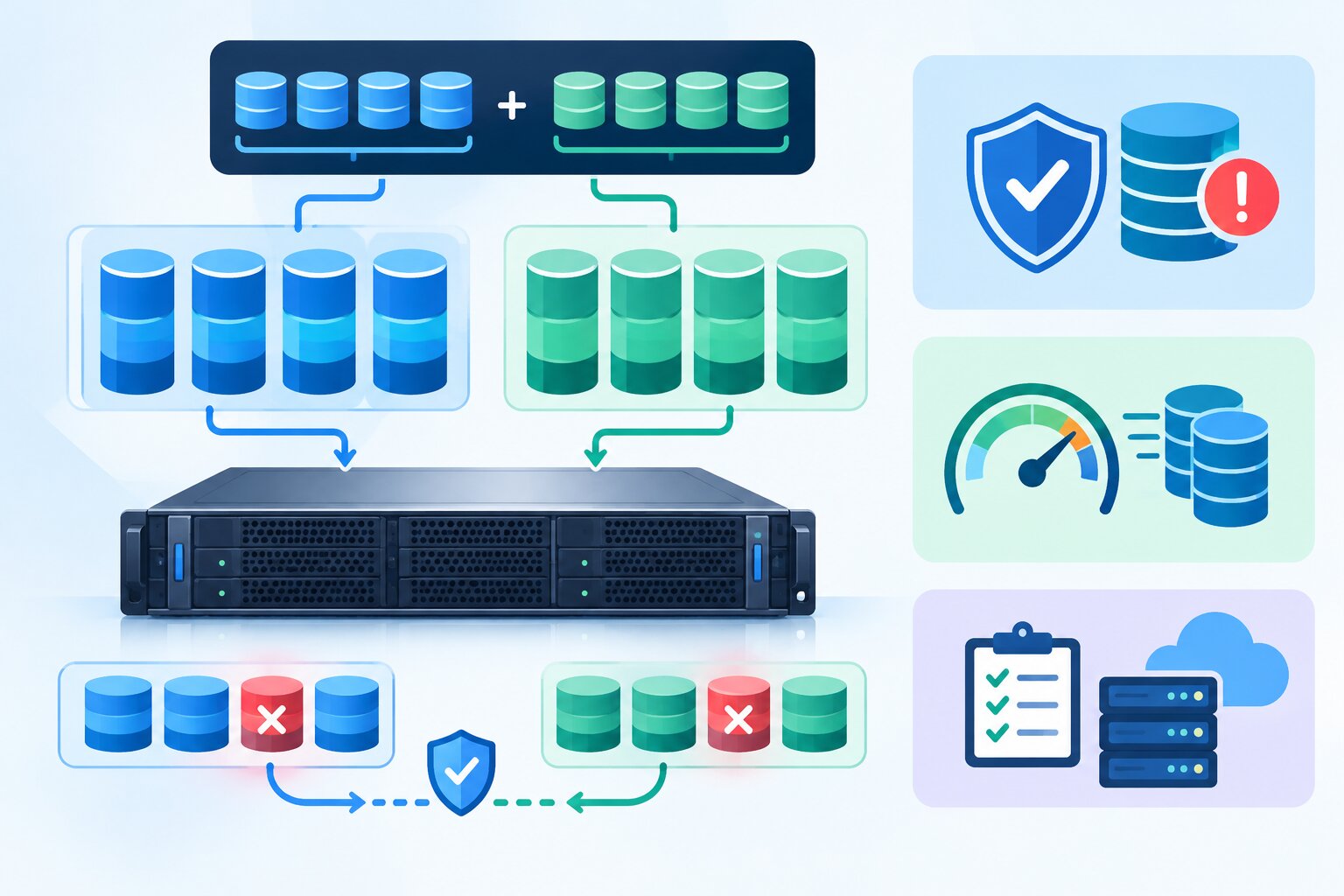
RAID 50 (also written RAID 5+0) combines two RAID levels into a single array. It groups drives into multiple RAID 5 sets, each with its own parity protection, then stripes data across those sets using RAID 0. This hybrid approach aims to deliver both the fault tolerance of RAID 5 and the performance boost of RAID 0. Related concepts include striping, parity, mirroring, and the broader RAID (Redundant Array of Independent Disks) family of storage configurations.
Think of RAID 50 as several small RAID 5 arrays working as a team, with RAID 0 layered on top to spread data across all of them for extra speed.
How RAID 50 Works
RAID 50 organizes drives into two distinct layers, and each layer plays a different role in the array’s overall behavior.
- RAID 5 sub-arrays (the tolerance layer) — Drives are divided into groups, each configured as its own RAID 5 array with distributed parity, so each group can survive one drive failure.
- RAID 0 striping (the performance layer) — Data gets striped across all the RAID 5 sub-arrays at once, which spreads read and write operations across more drives simultaneously.
- Combined result — You get the parity-based protection of RAID 5 within each group, plus the speed benefits of striping across groups.
RAID 50 Fault Tolerance: What It Actually Protects Against
Understanding RAID 50’s fault tolerance means understanding exactly what it can, and can’t, survive.
One drive failure per sub-array
Each RAID 5 sub-array can lose one drive without any data loss, since parity data lets the array rebuild the missing information.
Multiple failures across different sub-arrays
Because each sub-array handles parity independently, RAID 50 can actually survive multiple drive failures, as long as they happen in different sub-arrays, not the same one.
The critical limitation
If two drives fail within the same RAID 5 sub-array at the same time, that sub-array loses data. And since RAID 0 stripes across all sub-arrays, this failure takes down the entire array, not just one section.
RAID 50 vs. RAID 5 vs. RAID 10: A Comparison
| Feature | RAID 5 | RAID 10 | RAID 50 |
|---|---|---|---|
| Minimum drives | 3 | 4 | 6 |
| Fault tolerance | One drive failure | One drive per mirrored pair | One drive per sub-array |
| Usable capacity | High | Lower (50% of raw capacity) | High |
| Write performance | Moderate | Fast | Fast |
| Rebuild time | Slower | Faster | Moderate |
| Best for | General storage, budget-conscious setups | High-performance transactional workloads | Large storage arrays needing speed and protection |
Why Storage Teams Choose RAID 50
“RAID 50 hits a sweet spot for large storage arrays that need better write performance than plain RAID 5, without paying the capacity penalty that comes with RAID 10.” — Tom Kirkland, Senior Storage Architect, Enterprise Data Systems Group, 2025.
Large data sets need both speed and protection, and that’s exactly where RAID 50 earns its place. It performs noticeably better than standalone RAID 5 during write-heavy workloads, since data spreads across multiple sub-arrays instead of a single group. That said, it still requires solid backup practices on top of it. RAID protects against drive failure, but it doesn’t replace proper data recovery planning or granular recovery for accidental deletion or corruption.
When to Use RAID 50
- Large storage arrays — RAID 50 works best with higher drive counts, typically six or more, where its performance advantages become meaningful.
- Write-intensive workloads — Applications that write large amounts of data benefit from the added striping layer’s performance boost.
- Environments needing more protection than RAID 5 — If losing an entire array to a rare dual-drive failure would be catastrophic, RAID 50’s segmented fault tolerance adds a meaningful safety margin.
- Budget-conscious high-capacity storage — Compared to RAID 10, RAID 50 delivers more usable capacity from the same number of drives, which matters for large-scale storage needs.
- Data center environments with stable power — Because rebuilds are resource-intensive, pairing RAID 50 with reliable infrastructure, including a solid UPS setup, helps avoid rebuild interruptions during a power event.
Frequently Asked Questions
How many drives does RAID 50 require?
RAID 50 requires a minimum of six drives, since it needs at least two RAID 5 sub-arrays of three drives each to function.
Can RAID 50 survive two drive failures?
It depends on which drives fail. RAID 50 can survive two failures if they happen in different sub-arrays, but it will lose data if two drives fail within the same sub-array at the same time.
Is RAID 50 faster than RAID 5?
Yes, generally. The added RAID 0 striping layer spreads read and write operations across more drives, which improves performance compared to a standalone RAID 5 array.
Is RAID 50 a replacement for backups?
No. RAID protects against hardware failure, but it doesn’t protect against accidental deletion, corruption, ransomware, or site-wide disasters, so regular backups remain essential.
How does RAID 50 rebuild time compare to RAID 5?
Rebuild times for RAID 50 are generally faster than a single large RAID 5 array, since only the affected sub-array needs to rebuild, not the entire storage pool.
Conclusion
RAID 50 earns its place in larger storage environments by combining RAID 5’s parity-based protection with RAID 0’s performance benefits. It won’t survive every failure scenario, particularly a dual failure within the same sub-array, but for most large, write-intensive storage needs, it strikes a strong balance between speed, capacity, and fault tolerance. Just remember: RAID is one layer of protection, not a complete data protection strategy on its own.
For related reading, see our guides on database backup and recovery, granular recovery technology, and UPS power supply fundamentals.