Twenty percent of access keycards are lost or stolen every single year. For most offices, that’s a quiet, expensive emergency happening on repeat, reissuing badges, paying technicians to reprogram readers, and hoping no one walks through a door they shouldn’t have. Brivo Mobile Pass was built to end that loop. It turns the smartphone already in every employee’s pocket into a secure, revocable, cloud-managed key. In 2026, with hybrid work now permanent and physical security tied tighter than ever to cybersecurity, Brivo Mobile Pass has moved from a “nice convenience” to a serious workplace transformation tool. In this blog post we will learn how it actually works, and what’s changing for offices that adopt it.
What is a Brivo Mobile Pass?
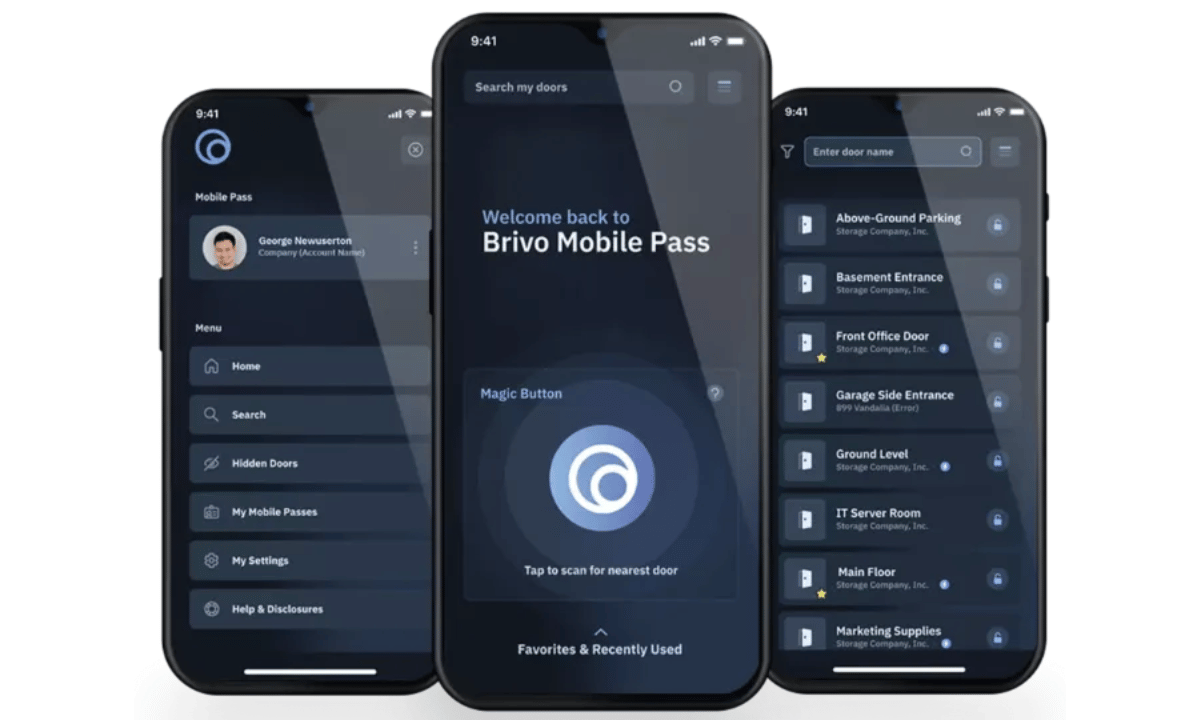
Brivo Mobile Pass is a cloud-based digital credential that lets employees unlock doors, gates, elevators, and parking garages using just their smartphone. It’s a built-in feature of the Brivo Access platform and works without any new card reader hardware administrators send an email invitation, the user activates the credential on their phone, and they’re set. No printing, no shipping, no replacement fees, no waiting for a technician to swing by.
Here is the main difference between Brivo Mobile Pass and a generic mobile access app:
- Cloud-authenticated: Brivo is not Bluetooth-only the credential is verified against Brivo’s secure cloud, not just stored on the phone
- Works across unlimited Brivo-equipped sites: One app handles your office, gym, and parking garage
- Revocable instantly: An admin can kill access in under 60 seconds when an employee leaves
- Hardware-agnostic: No need to replace your existing Brivo readers or control panels
We’ve broken down the full feature set in our What Is Brivo Mobile Pass guide, so this post focuses on the workplace transformation angle.
How Brivo Mobile Pass Works?
The mechanics behind Brivo Mobile Pass are simpler than legacy keycards but more secure under the hood. An admin in the Brivo Access dashboard selects a user and sends a Brivo Mobile Pass invitation by email. The user clicks the activation link, downloads the Brivo Mobile Pass app from the App Store or Google Play, and the digital credential lands on their phone, protected by the device’s existing passcode and biometrics. When they walk up to a door, the app communicates with Brivo’s authenticated cloud, which verifies the credential and tells the reader to unlock. The phone never has to “talk” directly to the reader the way a Bluetooth-only system does, which is why Brivo’s approach holds up against modern cloning threats.
The 2026 Brivo Platform Upgrades Most Offices Haven’t Caught Up To
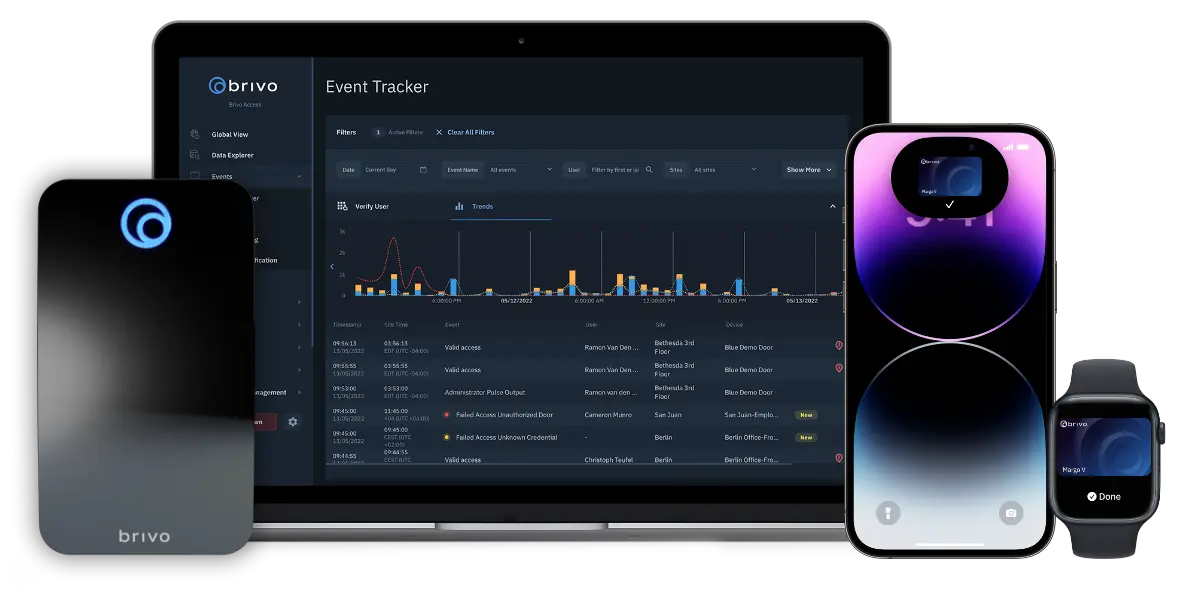
The Brivo Mobile Pass you’re getting in 2026 is significantly more powerful than what existed even two years ago. Brivo rolled out the unified Brivo Security Suite, layering access control, video, visitor management, and intrusion detection into a single dashboard. That means the mobile credential is no longer just for unlocking doors it’s the user’s entry point into a complete workplace security ecosystem. Most offices still running on a 2022 setup are missing capabilities they’re already paying for.
Here are the main 2026 additions that pair directly with Brivo Mobile Pass:
- Brivo Wallet Pass: Credentials stored natively in Apple Wallet and Google Wallet, no app open required
- Eeva AI video agent: Plain-language video analytics that flag events like “person without a hard hat at the loading dock”
- Genius Mobile Agent: Voice-activated emergency lockdown and zone-control commands
- Envoy integration: Pre-registered visitors automatically receive a temporary Brivo Mobile Pass for their visit window
If you’re evaluating the wider ecosystem, our Brivo Access Control System guide walks through which add-ons make sense for which workplace, and our breakdown of the top Brivo Access add-ons is a useful next read.
How Brivo Mobile Pass Is Transforming Workplace Security
This is where the technology stops being “cool” and starts being operationally significant. For office managers and site managers, the transformation isn’t really about smartphones — it’s about closing security gaps that have lived with keycards for decades. Brivo has now issued over 4 million Mobile Pass credentials globally, and the workplaces driving that adoption are reporting measurable improvements: roughly 40% fewer tailgating incidents in buildings using mobile credentials, dramatically faster offboarding, and audit trails that finally satisfy compliance teams without manual reconciliation.
Here are the main workplace security shifts Brivo Mobile Pass is driving in 2026:
- Offboarding speed: Terminated-employee access window drops from days to seconds
- Real-time audit trails: Every entry attempt is timestamped and logged for SOC 2, HIPAA, and ISO 27001 reviews
- Multi-site control: Manage one office or 100 from the same dashboard, with the same credential types
- Reduced tailgating: Users tap and go without fumbling for a card, so doors close faster behind them
- Sustainability win: Plastic cards generate roughly 5.7 million tons of waste annually; mobile eliminates it
Brivo Mobile Pass vs. Traditional Keycards
Most offices switching to Brivo Mobile Pass are coming from a legacy keycard or fob system. The contrast is sharper than most facility managers expect, especially once you factor in the three-year total cost of ownership and the security exposure of every lost badge sitting in a coffee shop somewhere.
Here is the main difference between Brivo Mobile Pass and traditional keycards:
| Factor | Brivo Mobile Pass | Traditional Keycards |
| Lifecycle cost | Digital, no reprint costs | $5–$15 per replacement card |
| Security | Cloud-authenticated + phone biometrics | Cloneable with a $30 device |
| Revocation speed | Under 60 seconds, remote | Hours to days |
| Loss rate | Phones rarely misplaced; remote wipe available | ~20% lost or stolen annually |
| Audit trail | Real-time and granular | Manual reconciliation |
| Sustainability | Zero plastic waste | Contributes to landfill plastic |
For offices weighing the wider infrastructure shift, our cloud vs on-premise access control breakdown explains the long-term cost math behind the move.
The Honest Friction Points No One Talks About
We deploy Brivo systems for a living, so we’ll tell you what the marketing pages won’t. Brivo Mobile Pass is excellent, but it isn’t magic and pretending otherwise sets offices up for frustration on day one. The most common complaint we hear from users is unlock latency: someone opens the app, waits five to fifteen seconds, and the door finally responds. There are real, fixable causes for this, but you need to know about them before you switch.
Here are the main friction points to plan for, and how to handle each one:
- Latency on initial unlock: usually a BLE handshake or weak Wi-Fi signal at the door; resolved with proper reader placement during install
- Dead-battery scenarios: always keep a backup credential (PIN code or supervisor keycard) for at least 5% of staff
- Network downtime: Brivo readers cache credentials locally, so doors keep working briefly during outages
- BYOD vs. company-issued phones: set the policy before rollout, not after, especially in regulated industries
These aren’t dealbreakers, they’re install decisions. A certified integrator catches them all during the site audit, which is why the install partner matters at least as much as the platform itself.
Why Spotter Security Partners with Brivo
Spotter Security is a Canadian commercial security integrator with two decades of field experience installing access control, video surveillance, and alarm systems for offices, construction sites, healthcare facilities, and multi-site enterprises across the country. We’re a certified Brivo partner, which means our technicians are trained directly on the Brivo Access platform, Mobile Pass, Wallet Pass, Security Suite, control panels, and the new 2026 AI integrations.
Our team handles the pre-install site audit, the network and reader placement decisions, the rollout to your staff, and the ongoing support all on Brivo hardware we know inside and out. If you’re considering Brivo Mobile Pass for your office, our Brivo Access Control brand page outlines the full product range we deploy, and our team is always happy to walk you through what a 30, 60, or 90-day rollout would look like for your specific space.