Antivirus software catches known threats by matching them against a signature database — but what stops something brand new that no one’s seen before? That’s the gap HIPS is built to close. This guide explains what a Host Intrusion Prevention System actually does, how it works at the device level, and how it fits alongside the rest of your security stack.
What Is HIPS (Host Intrusion Prevention System)?
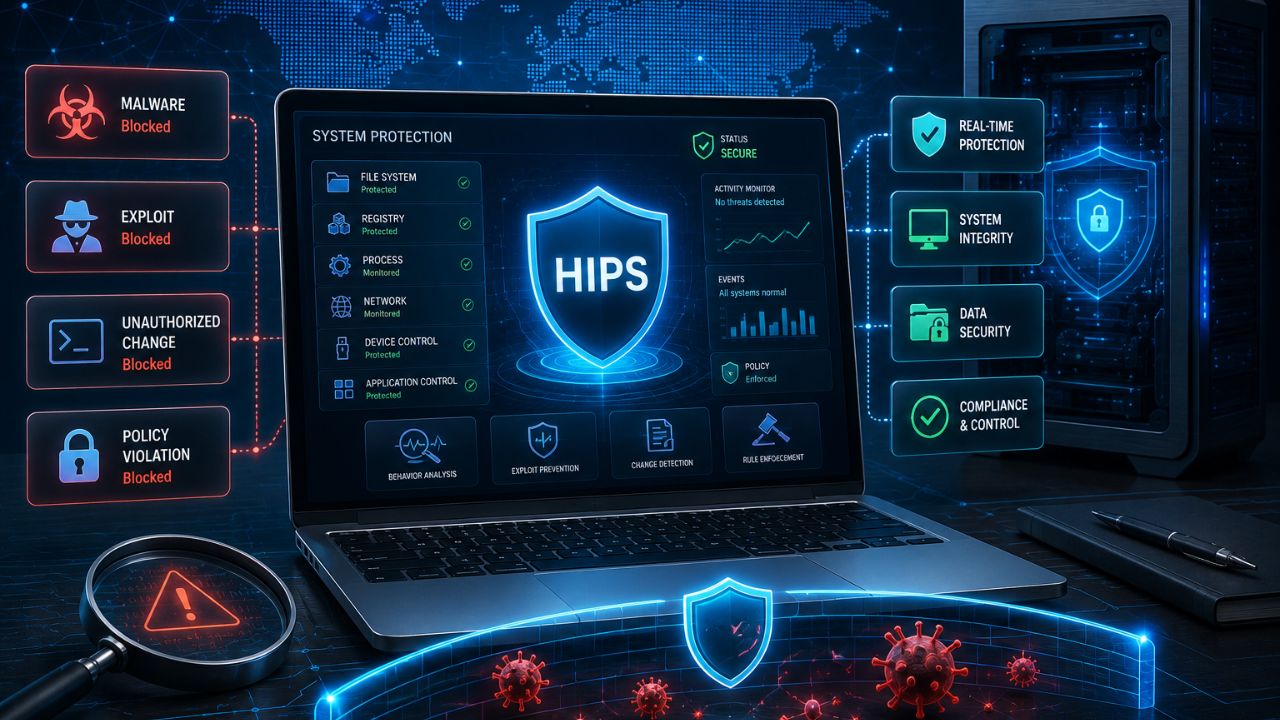
A Host Intrusion Prevention System (HIPS) is a type of security software installed directly on an individual device — such as a server, laptop, or workstation — that monitors system activity in real time and automatically blocks actions it identifies as malicious or unauthorized. Rather than relying solely on a database of known threat signatures, HIPS watches how programs actually behave on the device, such as attempting to modify critical system files, inject code into other processes, or make unusual changes to the registry.
This behavior-based approach is what separates HIPS from more traditional security tools, and it’s part of why HIPS remains a meaningful layer in protecting businesses from insider threats and other attacks that don’t rely on previously known malware.
How Does HIPS Work?
HIPS works by continuously monitoring system-level activity on a host device — including file access, process behavior, network connections, and registry changes — and comparing that activity against a set of rules or behavioral baselines to identify and block suspicious actions before they cause harm. When an application attempts something outside its normal, expected behavior, such as a word processor suddenly trying to modify system-critical files, HIPS can intervene and stop the action automatically, often before the user or any traditional antivirus scan would even notice.
Most HIPS solutions rely on a combination of two detection approaches:
- Rule-based detection. Predefined rules block specific known-risky behaviors, such as unauthorized attempts to disable security software or modify boot-level system files.
- Behavioral/heuristic detection. The system establishes a baseline of “normal” behavior for applications and processes, then flags and blocks significant deviations from that baseline, even if the specific threat has never been seen before.
HIPS vs. HIDS: What’s the Difference?
The key difference between HIPS and HIDS is action: a Host Intrusion Prevention System (HIPS) actively blocks suspicious activity in real time, while a Host Intrusion Detection System (HIDS) only monitors and alerts security teams to suspicious activity without automatically stopping it. Because of this, HIPS requires more careful tuning — an overly aggressive HIPS configuration can accidentally block legitimate software, while HIDS carries less operational risk but requires a human or automated response after the alert fires.
| Factor | HIPS | HIDS |
|---|---|---|
| Action taken | Actively blocks threats | Alerts only, no automatic blocking |
| Risk of false positives disrupting work | Higher | Lower |
| Response speed | Immediate, automatic | Depends on manual or secondary response |
| Best for | Environments needing automated real-time defense | Environments prioritizing visibility with human oversight |
HIPS vs. Antivirus: What’s the Difference?
The core difference between HIPS and traditional antivirus is detection method: antivirus primarily identifies threats by matching files against a database of known malware signatures, while HIPS focuses on monitoring behavior and system activity, allowing it to catch threats that don’t match any known signature. This makes HIPS particularly effective against zero-day attacks — new, previously unseen threats that signature-based antivirus simply hasn’t been updated to recognize yet.
In practice, most organizations don’t have to choose one over the other. Modern endpoint protection platforms typically bundle both signature-based antivirus scanning and HIPS-style behavioral monitoring into a single product, layering the two approaches for broader coverage.
What Are the Benefits of HIPS?
The main benefit of a Host Intrusion Prevention System is its ability to block previously unknown threats by identifying malicious behavior rather than relying on a threat already being documented in a signature database. Additional benefits include:
- Real-time blocking, stopping malicious actions as they happen rather than only detecting them after the fact.
- Protection against zero-day exploits, since behavior-based detection doesn’t depend on the threat being previously identified.
- Reduced reliance on constant signature updates, since behavioral rules remain effective even against new malware variants.
- Granular control, allowing security teams to define specific rules around what activity is and isn’t permitted on protected devices.
What Are the Limitations of HIPS?
The main limitation of HIPS is the risk of false positives — because it makes decisions based on behavior patterns rather than confirmed, known threats, legitimate software occasionally triggers a block, which can disrupt normal business operations if not properly tuned. Other limitations include:
- Configuration complexity. Getting the balance right between strong protection and minimal false positives typically requires ongoing tuning and monitoring.
- Performance overhead. Continuous, real-time monitoring of system activity can consume more device resources than simpler, periodic antivirus scans.
- Not a complete security solution on its own. HIPS is most effective as one layer within a broader security strategy, not a standalone replacement for network security, patching, and user training.
Frequently Asked Questions
Q: What does HIPS stand for in cybersecurity?
HIPS stands for Host Intrusion Prevention System, a type of security software that monitors and actively blocks suspicious activity directly on an individual device rather than at the network level.
Q: Is HIPS the same as antivirus software?
No — antivirus primarily detects threats by matching known malware signatures, while HIPS focuses on monitoring and blocking suspicious behavior, allowing it to catch previously unknown threats that antivirus alone might miss.
Q: Can HIPS block legitimate software by mistake?
Yes, this is one of the main trade-offs of behavior-based detection — HIPS can occasionally flag and block legitimate software that behaves in an unusual way, which is why proper rule tuning is important.
Q: What’s the difference between HIPS and a firewall?
A firewall primarily controls network traffic based on IP addresses, ports, and protocols, while HIPS monitors activity happening directly on the device itself, such as file changes and process behavior — the two typically work together rather than replacing each other.
Q: Do I still need antivirus if I have HIPS?
Most security experts recommend using both together, since antivirus efficiently catches known threats through signature matching, while HIPS adds a behavioral layer that can catch new or unknown threats antivirus might miss.
Q: Is HIPS suitable for small businesses?
Yes — many modern endpoint protection platforms include HIPS functionality by default, making it accessible to small businesses without requiring a dedicated security team to manage it separately.
Final Thoughts
HIPS fills a gap that signature-based security tools structurally can’t cover on their own: catching threats that haven’t been seen and documented yet. By watching how software actually behaves on a device rather than just checking it against a known-threat list, HIPS adds a meaningful layer of defense against zero-day attacks and novel malware — making it a standard, often invisible, component of modern endpoint protection rather than a niche add-on.