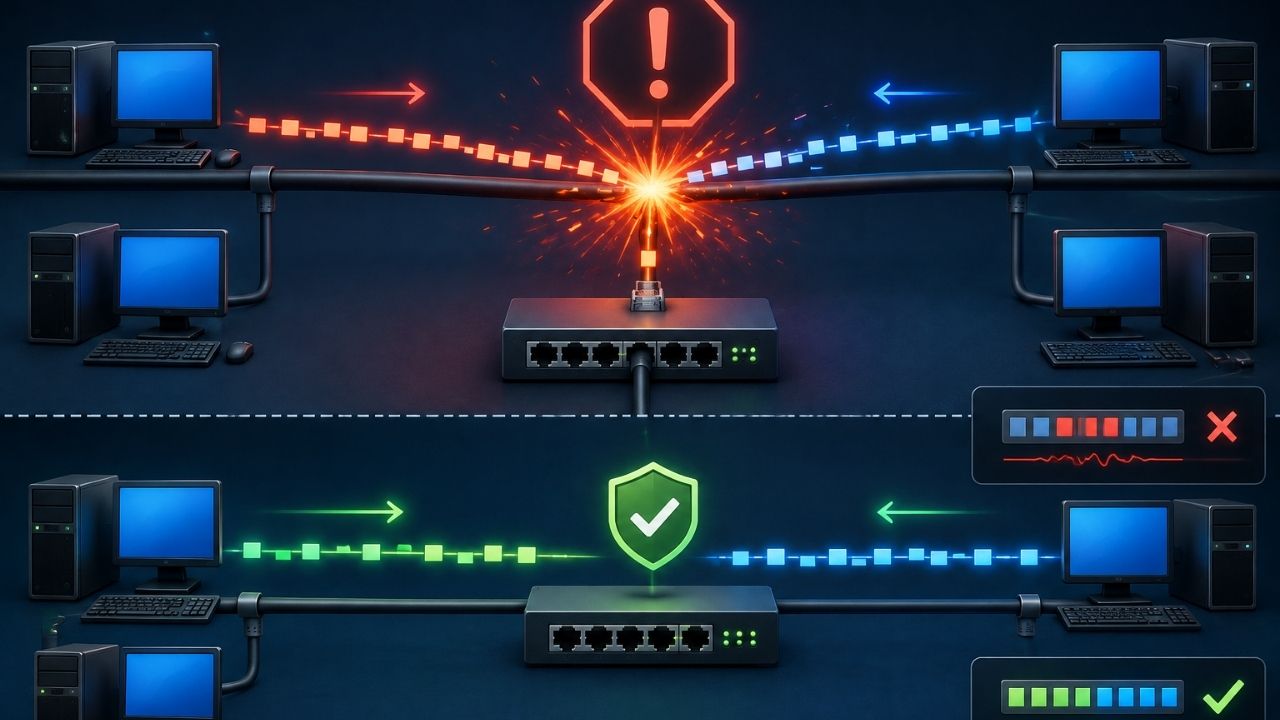
Two devices try to talk on the same wire at the same moment. Both messages get corrupted. That’s a network collision. Modern switched networks have made collisions far rarer than they were in the days of shared hubs. Even so, they still show up in legacy setups, half-duplex links, and misconfigured hardware. Here’s what causes them, why they hurt performance, and how to eliminate them for good.
Key Takeaways
- A network collision happens when two devices transmit data on a shared segment at the same time, corrupting both signals.
- Collisions are mostly a legacy issue tied to older Ethernet hubs and half-duplex connections.
- Ethernet originally used CSMA/CD to detect and recover from collisions.
- Modern switched, full-duplex networks largely eliminate collisions, since each device gets its own dedicated path.
- Persistent collisions today usually point to duplex mismatches, faulty cabling, or outdated hub-based equipment — issues closely tied to how a network is segmented and how routing is configured.
What Is a Network Collision?
A network collision occurs when two or more devices on the same segment transmit data at the same time. The signals interfere and corrupt the data. Early shared-hub networks saw collision rates climb sharply as more devices joined the same segment. That’s a big reason the industry moved away from hubs entirely. This ties into related concepts like Ethernet, the network hub, half-duplex and full-duplex transmission, and CSMA/CD, the protocol built to manage this exact problem.
Picture two people trying to speak into the same phone line at once. Neither message comes through clearly. Both have to be resent. That’s essentially what happens during a collision.
How Network Collisions Happen
Collisions aren’t random. They result directly from how a network segment is built and how devices share it. Here’s what causes them:
- Shared media — Multiple devices on the same hub or coaxial segment all listen and transmit on the same physical channel.
- Simultaneous transmission — Two devices sense the line is idle, then start sending data at nearly the same instant.
- Half-duplex connections — A device that can only send or receive at one time, not both, is far more prone to collisions than a full-duplex connection.
- Propagation delay — On longer cable runs, a signal takes time to reach every device. That creates a small window for a collision, even when devices check the line first.
CSMA/CD: How Ethernet Originally Handled Collisions
CSMA/CD (Carrier Sense Multiple Access with Collision Detection) is the protocol early Ethernet used to detect and recover from collisions automatically. It works in three stages.
Carrier sense
Before transmitting, a device “listens” to the shared line. This tells it whether the line is idle or already in use.
Multiple access
Because the media is shared, multiple devices can attempt transmission at once. This is exactly what creates the possibility of a collision in the first place.
Collision detection and backoff
If a collision happens, all transmitting devices stop. They wait a random amount of time, called a “backoff” period, then try again. This reduces the odds of an immediate repeat collision.
Collision Domain vs. Broadcast Domain
| Feature | Collision Domain | Broadcast Domain |
|---|---|---|
| What it defines | The segment where collisions can occur | The segment where broadcast traffic is shared |
| Reduced by | Switches (each port is its own collision domain) | Routers or VLANs |
| Modern relevance | Mostly eliminated by switched networks | Still a key factor in network design |
| Related to | Hub-based, shared-media networks | Broader network segmentation strategy |
Why Collisions Hurt Network Performance
“Every collision means retransmitted data, and retransmissions eat into available bandwidth fast. On a heavily loaded hub-based segment, that overhead alone could account for a meaningful chunk of total traffic.” — James Whitfield, Network Engineering Lead, Enterprise Connectivity Group, 2025.
Collisions don’t just disappear quietly. Both devices involved have to detect the failure, wait, then resend their data. That adds latency. It also eats up bandwidth that could carry new traffic instead. On networks that still rely on shared segments, or on wide area network links with long propagation delays, this overhead compounds fast. As more devices join, performance degrades for everyone on that segment, not just the two devices in a given collision.
5 Ways to Prevent Network Collisions
- Replace hubs with switches — Switches give each connected device its own dedicated collision domain. This effectively eliminates collisions in modern wired networks.
- Use full-duplex connections wherever possible — Full-duplex allows simultaneous sending and receiving. That removes the shared-channel conflict that causes collisions.
- Fix duplex mismatches — Make sure both ends of a connection use the same duplex mode. A mismatch is one of the most common causes of collisions on modern networks.
- Segment large networks appropriately — Breaking a large shared segment into smaller, switched segments reduces the number of devices competing for the same channel.
- Inspect and replace faulty cabling — Damaged or poor-quality cables can introduce signal issues that mimic or worsen collision-related errors. So rule out physical layer problems first.
Frequently Asked Questions
Do modern networks still have collisions?
Rarely. Modern switched, full-duplex Ethernet networks largely eliminate collisions, since each device gets its own dedicated path instead of sharing a single channel.
What causes a duplex mismatch?
This usually happens when one end of a connection is manually set to half-duplex while the other uses full-duplex, or when auto-negotiation fails between a device and a switch port.
Can Wi-Fi networks have collisions?
Yes. Wireless networks use a related protocol called CSMA/CA (Collision Avoidance) instead, since it’s harder for a wireless device to detect a collision while also transmitting.
How do I check if collisions are happening on my network?
Most managed switches log collision counts per port. Network administrators can review this through the switch’s management interface or SNMP monitoring tools to spot problem segments.
Is a collision the same as network congestion?
No. Congestion means too much legitimate traffic competing for available bandwidth. A collision is a specific physical-layer event where two transmissions interfere with each other on a shared segment.
Conclusion
Network collisions used to be routine on shared hub-based segments. Modern switched, full-duplex infrastructure has changed that. Today, collisions are rare and usually diagnosable, not an unavoidable cost of doing business. If collisions still show up on your network, that’s almost always a sign of outdated hardware, a duplex mismatch, or a cabling issue. It’s worth investigating, not working around.
For related reading, see our guides on network segmentation, static vs. dynamic routing, and wide area networks.