A server goes down at 2 a.m. The nearest engineer is a four-hour flight away. This is exactly the scenario remote hands service solves. It’s one of the most-used line items on a colocation contract. But it’s also one of the most misunderstood. So let’s break down what it actually covers, how it differs from “smart hands,” and when you actually need it.
Key Takeaways
- Remote hands service means data center staff perform on-site tasks for you when you can’t be there in person.
- It typically covers basic tasks like power cycling, cable checks, and visual inspections.
- “Smart hands” goes further. It covers technical work like configuration changes and troubleshooting.
- Providers usually bill remote hands hourly, or bundle a set number of hours into your colocation contract.
- Remote hands works alongside infrastructure like switched PDUs and HA architecture to keep equipment running without a site visit.
What Is Remote Hands Service?
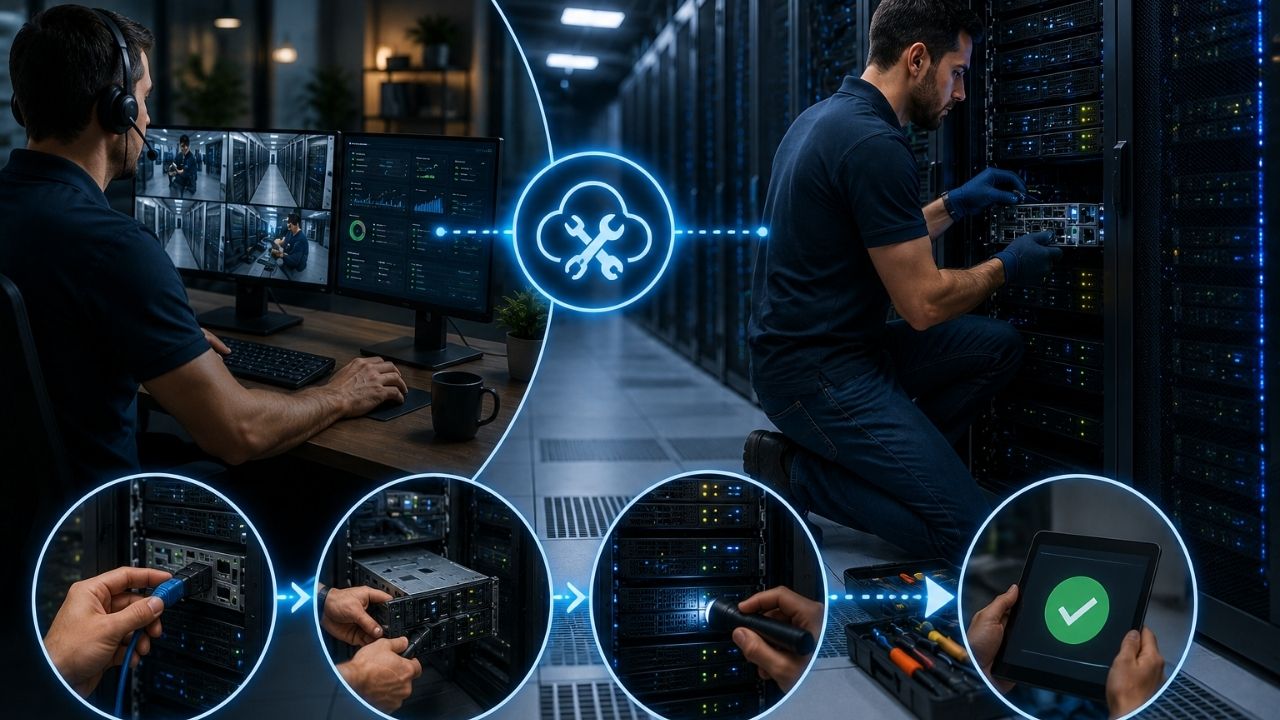
Remote hands service means data center staff perform on-site technical support for you when you can’t physically be at the facility. Providers typically charge $75 to $200 per hour, depending on task complexity and service tier. This connects to a broader ecosystem: colocation, the network operations center (NOC), rack access, and on-site technicians all work together so you can manage equipment you never visit.
In plain terms, remote hands answers a simple problem: you need someone to physically touch your server, but you’re not in the building. Instead of booking a flight, you contact the facility’s support team. A technician handles the task directly. That’s the whole idea.
What Remote Hands Typically Covers
Not every task falls under remote hands. Providers draw a clear line between basic physical support and advanced technical work. Here’s what’s usually included:
- Power cycling equipment — Rebooting a server or switch that’s stopped responding.
- Visual inspections — Checking indicator lights, cable connections, or physical damage.
- Cable management — Plugging, unplugging, or re-routing network and power cables.
- Basic hardware swaps — Replacing a failed drive or component you ship to the facility.
- Package handling — Receiving, unboxing, and racking new equipment shipments.
Remote Hands vs. Smart Hands: What’s the Difference?
Remote hands covers physical, low-complexity tasks
This sticks to tasks that don’t require deep technical knowledge. Plugging in a cable. Pressing a power button. Reading a display. Think of it as basic troubleshooting, similar to what you’d expect from a general support desk.
Smart hands covers technical, configuration-level work
Smart hands goes further. It includes configuring network devices, running diagnostics, or fixing software-level issues. As a result, it usually requires a more senior or specialized technician.
Pricing reflects that difference
Because smart hands demands more expertise, providers typically bill it at a higher hourly rate. Many also require signed authorization or a formal ticket before making configuration changes.
| Feature | Remote Hands | Smart Hands |
|---|---|---|
| Task complexity | Basic, physical tasks | Technical, configuration-level tasks |
| Example task | Power cycle a server | Reconfigure a switch VLAN |
| Typical hourly rate | Lower | Higher |
| Skill level required | General facility staff | Specialized technician |
| Authorization needed | Usually minimal | Often requires a signed change request |
Why Remote Hands Matters for Colocation Customers
“Remote hands is what makes colocation actually work for companies without local staff. Without it, a simple cable swap could mean days of downtime while someone flies out.” — Elena Vasquez, Director of Data Center Operations, Global Colocation Partners, 2025.
If your equipment sits in a colocation facility far from your office, remote hands often makes the difference between a five-minute fix and a multi-day outage. This matters even more for teams running high-availability architecture, where every minute of downtime carries a real cost. It also matters for setups using on-demand computing resources, since those need fast physical intervention when hardware fails.
How to Get the Most Out of Remote Hands Service
- Know your included hours — Most colocation contracts bundle a set number of remote hands hours per month. Confirm this before an emergency hits.
- Write clear, specific instructions — A ticket that says “check if the amber light on port 3 of switch B is on” gets resolved faster than a vague description.
- Keep spare hardware on-site — Pre-shipping spare drives or cables cuts resolution time significantly.
- Understand the escalation path — Know which tasks need sign-off in advance. Otherwise, you’ll wait on approval during an outage.
- Test the process early — Run a low-stakes request, like a routine cable check, to learn your provider’s turnaround time and communication style.
Frequently Asked Questions
How much does remote hands service cost?
Remote hands typically costs between $75 and $200 per hour. However, many colocation contracts include a set number of hours per month at no extra charge.
Is remote hands available 24/7?
Most tier 3 and tier 4 data centers offer round-the-clock remote hands support. Still, availability and response times vary by provider, so confirm SLA terms before signing.
Can remote hands technicians configure my network equipment?
Usually not. Basic remote hands sticks to physical tasks. Configuration changes typically fall under smart hands, which may need additional authorization.
Do I need remote hands if I have local IT staff?
It depends. Even companies with local staff often use remote hands for facilities far from their offices, or as a faster first response before staff can travel on-site.
What information does a remote hands ticket need?
A good ticket includes the exact rack and equipment location, a clear task description, and relevant photos or diagrams. This avoids back-and-forth delays.
Conclusion
Remote hands service turns “I need physical access to my server” into a request you can resolve in minutes, not days. That makes it one of the most practical tools for any company running equipment in a colocation facility. Understand what’s covered under remote hands versus smart hands. Know your provider’s included hours and escalation process. Do that, and you’ll save both time and money the next time something goes wrong at 2 a.m.
For related reading, see our guides on selecting the right UPS, what high availability (HA) means, and on-demand computing.