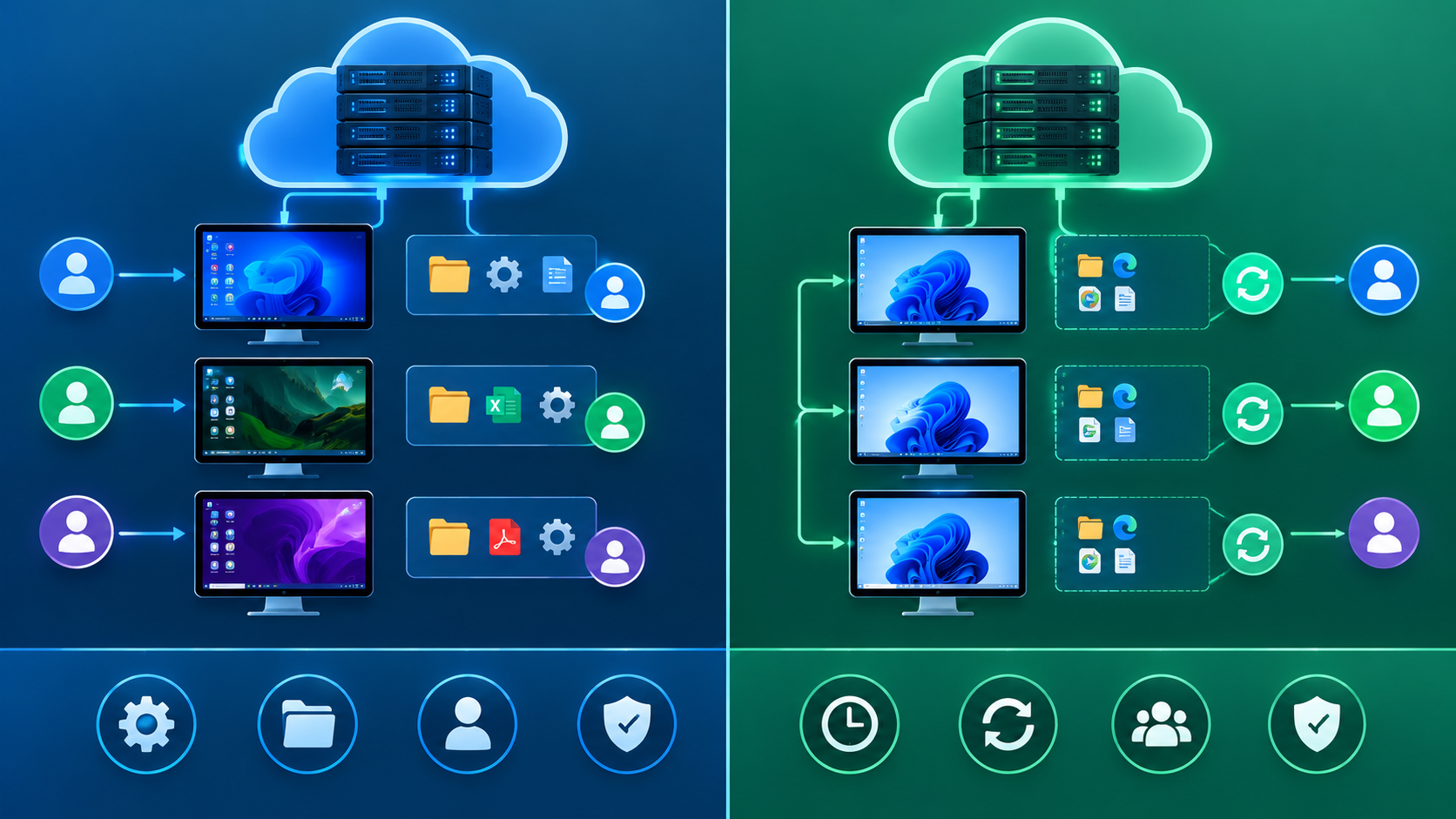
Every VDI deployment forces the same fundamental choice early on: should each user get their own personal desktop, or should everyone share a pool of identical, disposable ones? That decision shapes cost, storage needs, and user experience for the entire deployment. Here’s exactly how persistent and non-persistent desktops differ, and how to decide which one fits your organization.
Key Takeaways
- Persistent desktops give each user a dedicated virtual machine that retains changes between sessions.
- Non-persistent desktops reset to a clean state after each session, drawing from a shared pool.
- Persistent desktops cost more in storage but offer a familiar, personalized experience.
- Non-persistent desktops scale more easily and simplify security management.
- The right choice depends on user roles, not just cost, and ties directly into the broader advantages of VDI an organization is trying to capture.
What’s the Difference Between Persistent and Non-Persistent Desktops?
In a VDI environment, a persistent desktop is a dedicated virtual machine assigned to one specific user, retaining all their files, settings, and installed applications between sessions, just like a physical desktop would. A non-persistent desktop, by contrast, gets pulled from a shared pool of identical virtual machines and resets to its original clean state once the user logs off. Enterprise VDI deployments increasingly mix both models within the same organization, assigning each type based on actual user needs rather than defaulting to one approach across the board. Related concepts include the golden image, desktop pools, user profile management, and application layering.
Think of a persistent desktop as your own personal office. A non-persistent desktop is more like a shared meeting room. It’s fully functional while you’re using it, but it resets for the next person.
How Persistent Desktops Work
Dedicated, one-to-one assignment
Each user connects to the same specific virtual machine every time they log in, and any changes they make, installed software, saved files, custom settings, persist across sessions.
Storage requirements grow individually
Because every user’s desktop retains its own unique state, storage needs grow linearly with the number of users, since each desktop essentially becomes its own unique environment over time.
Best suited for specialized roles
Persistent desktops fit users who need consistent access to specialized software configurations, like developers or engineers who customize their environment extensively.
How Non-Persistent Desktops Work
Shared pool, clean state each time
Users draw from a pool of identical virtual machines built from a single “golden image.” When a session ends, the desktop reverts to that original clean state, discarding any changes made.
Storage stays efficient
Since all desktops in the pool share the same base image, storage requirements stay far more predictable and efficient, even as user counts scale up significantly.
Best suited for task-based roles
Non-persistent desktops work well for call center staff, kiosk users, or any role where users perform similar tasks without needing deep personalization.
Persistent vs. Non-Persistent Desktops: Comparison
| Feature | Persistent Desktops | Non-Persistent Desktops |
|---|---|---|
| User assignment | One-to-one, dedicated | Pulled from a shared pool |
| Personalization | Retained between sessions | Resets after each session |
| Storage requirements | Higher, grows per user | Lower, shared base image |
| Management complexity | Higher, patches applied individually | Lower, patches applied to golden image once |
| Best for | Developers, power users, specialized roles | Call centers, kiosks, task workers |
| Security consistency | Varies as users customize environments | Consistent, since state resets regularly |
Why This Choice Matters for Cost and Security
“Organizations that default to persistent desktops for everyone almost always end up paying for storage they don’t need. The smarter approach segments users by actual need, not by convenience of deploying one model everywhere.” — Rachel Kim, VDI Solutions Architect, Enterprise Workplace Technology Group, 2025.
Non-persistent desktops offer a meaningful security advantage, since any malware or unwanted changes get wiped automatically when the session resets. Persistent desktops, on the other hand, deliver a smoother user experience for people who genuinely need a customized environment. Getting this balance right directly affects both the cost and the overall success of a broader move toward VDI adoption.
How to Choose the Right Model for Your Team
- Segment users by role and need — Identify which users require persistent customization versus which perform standardized, repeatable tasks.
- Evaluate storage budget constraints — Factor in that persistent desktops require significantly more storage capacity as user counts grow.
- Consider security requirements — For high-risk roles or public-facing kiosks, non-persistent desktops offer a built-in security reset that’s hard to replicate otherwise.
- Plan for a hybrid approach — Most organizations benefit from mixing both models rather than forcing every user into the same desktop type.
- Test user experience before full rollout — Pilot both models with representative user groups to confirm the chosen approach actually meets real workflow needs.
Frequently Asked Questions
Can a user switch between persistent and non-persistent desktops?
Typically not seamlessly. Since the two models handle storage and state differently, moving a user between them usually requires reprovisioning their desktop rather than a simple toggle.
Are non-persistent desktops less secure than persistent ones?
Generally, non-persistent desktops offer a security advantage, since any compromise or unwanted change gets wiped automatically when the session resets, unlike a persistent desktop that retains state indefinitely.
Do persistent desktops cost significantly more than non-persistent desktops?
Yes, typically. Persistent desktops require more storage per user and more individualized patch management, both of which add ongoing cost compared to a shared, non-persistent pool.
Can I use non-persistent desktops for developers?
It’s possible with proper application layering or profile management tools, but most organizations still prefer persistent desktops for developers who need consistent, customized environments.
How do updates work differently between the two models?
Non-persistent desktops only require updating the golden image once, and every session automatically reflects that update. Persistent desktops need individual patching across every user’s unique desktop instance.
Conclusion
Persistent and non-persistent desktops solve different problems, and neither one is universally right. Persistent desktops deliver the personalized, consistent experience specialized users need, at a higher storage and management cost. Non-persistent desktops scale efficiently and reset cleanly, making them ideal for task-based roles. Most successful VDI deployments use both, matching the model to the actual user, not defaulting to a single approach across the whole organization.
For related reading, see our guides on advantages of VDI, server-based computing, and high availability (HA).